


SMA
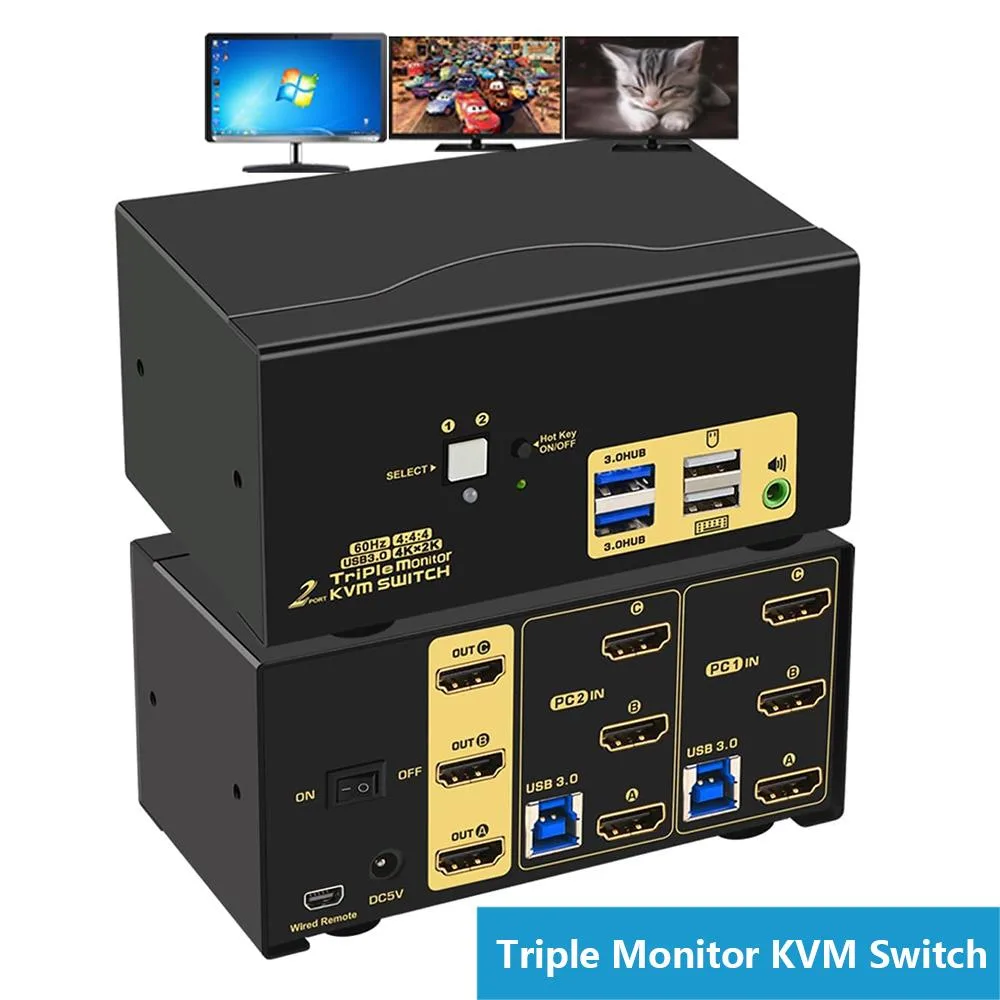
SMA 2-Port Triple-Monitor HDMI KVM Switch 4K@60Hz USB 3.0
Share two computers across three 4K 60 Hz monitors with USB 3.0 hub, audio output and four switching methods
- TypeHDMI, USB
- PC Connectors2 PCs
- Computer Connections2 Ports
- Monitor Connections3 Ports
- Video Resolution3840 x 2160
- PC SelectionPush Buttons/Hot Keys
- Controls 2 PCs with 1 keyboard, mouse & 3 monitors
- 4K 60 Hz video across three displays
- USB 3.0 hub adds two high-speed peripheral ports
- Four switch methods: hot-keys, mouse wheel, front button, wired remote
- All cables and power adapter included in the box
Triple-monitor KVM for two computers
This HDMI KVM switch lets two PCs share three monitors, a single keyboard and mouse, a headset and two USB 3.0 peripherals. It supports 4K resolution at 60 Hz and includes all required cables plus a wired remote button. The unit is driver-free across Windows, Linux and macOS.
Passive cooling with external power
The switch operates without fans and draws power from an included DC 5 V 2 A adapter, so it adds no audible noise to a workstation. LED indicators show the active port, and the metal enclosure dissipates heat during continuous use. No additional power supply is required beyond the bundled adapter.
Desktop footprint and cable bundle
Measuring 5.12 by 2.95 by 2.48 inches and weighing 3.26 pounds, the switch fits on a desk without needing rack space. Six HDMI cables and two USB 3.0 cables are supplied, reducing extra purchases. Each computer must provide three video outputs to drive all three monitors simultaneously.
Highlights
- Controls 2 PCs with 1 keyboard, mouse & 3 monitors
- 4K 60 Hz video across three displays
- USB 3.0 hub adds two high-speed peripheral ports
- Four switch methods: hot-keys, mouse wheel, front button, wired remote
- All cables and power adapter included in the box
Specifications
| Type | HDMI, USB |
|---|---|
| PC Connectors | 2 PCs |
| Computer Connections | 2 Ports |
| Monitor Connections | 3 Ports |
| Video Resolution | 3840 x 2160 |
| PC Selection | Push Buttons/Hot Keys |
| Monitors Supported | Triple Monitor |
| LED Indicators | Yes |
| Audio Features | with Audio |
| Power Features | Requires no additional power supply |
| USB Features | with USB support |
| Application | KVM Switch Triple Monitor: 2 HDMI in, 3 HDMI output. It allows 2 computers/laptops sharing one set USB of keyboard & mouse, 3 monitors, headset, and 2 pcs USB 3.0 peripheral devices. With digital audio output and all input cables. Support HDMI 2.0, HDCP 2.2, emulation EDID, HDR 10. (Tips: This KVM switch requires each of your PCs with 3 or more video outputs.) |
| Features | KVM Switch HDMI Triple Monitor: Support wireless / wired / mechanical / gaming / programmable / Unify / Apple keyboard & mouse. Supports touch screen, OLED screen, widescreen, ultra-wide screen, etc. Drive-free for Windows 10/7/2000/XP/Vista, Linux, Mac, Debian, Ubuntu, Fedora, Raspbian, Ubuntu, etc. Four switching ways optional: Hotkey switching(Num Lock + Num Lock + 1 / 2 + Enter, or Ctrl + Ctrl + 1 / 2 + Enter or Scroll Lock+ Scroll Lock+1 / 2 + Enter), mouse switching (click mouse wheel 2 times), manual button switching, and wired remote push-button switching. |
| Dimensions | 5.12 x 2.95 x 2.48 inches |
| Weight | 3.26 Pounds |
| Package Contents | 1 x HDMI KVM switch + 1 x DC5V 2A power adapter + 2 x USB 3.0 cable + 6 x HDMI cables + 1 manual + 1 wire remote push button switch |
Questions about this item
How do I connect both computers to the KVM switch using the included USB 3.0 and HDMI cables?
Plug the two supplied USB 3.0 cables and six HDMI cables between each computer and the switch, then connect the three monitors to the switch HDMI outputs, attach keyboard and mouse to the dedicated ports, and finally plug in the DC5V 2A power adapter before turning anything on.
What ongoing maintenance does the KVM switch require after installation?
No scheduled maintenance is needed; simply keep the ventilation slots clear of dust and verify cable connections remain firm if you move the unit.
What is the first limitation I will hit when running three 4K monitors at 60 Hz continuously?
The switch supports 3840 x 2160 at 60 Hz per display, so sustained use at that resolution and refresh rate is within its rated video capability.
Also in this aisle
People compared these
Same shelf, same checkout — eight coins and a 30-minute rate lock.


Black Box Corporation
Black Box Corporation 4K60 HDMI Dual-Head KVM Switch 4 Port
$774.99
0.00934061BTC
In stock