
NVIDIA
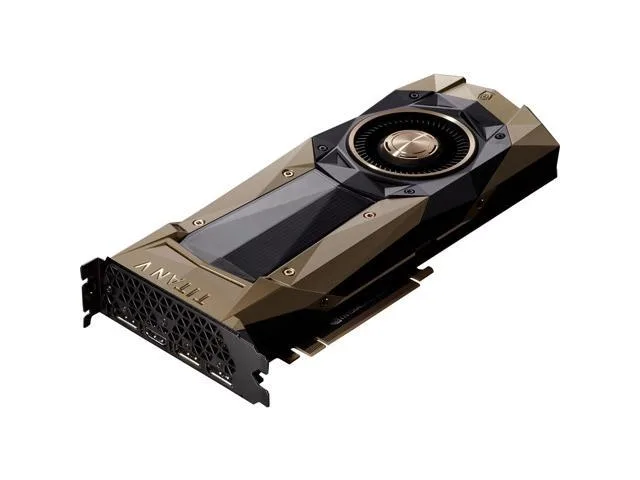
NVIDIA TITAN V 1.20 GHz 1.46 GHz 12 GB HBM2 Dual Slot graphics card
A graphics card with 12 GB HBM2 memory on a 3072-bit bus, running at 1.20 GHz base and 1.46 GHz boost clocks in a dual-slot design
- Memory TypeGDDR5
- 12 GB HBM2 memory handles large datasets
- 3072-bit bus width feeds the GPU fast
- 46 GHz boost clock accelerates heavy workloads
- HDMI and three DisplayPort outputs drive multiple displays
- Dual-slot design fits standard workstation cases
NVIDIA TITAN V 12 GB HBM2
The NVIDIA TITAN V is a dual slot graphics card built on the TITAN V chipset with 12 GB of HBM2 memory. A 3072 bit bus connects the GPU to memory at a core clock of 1.20 GHz and a boost clock of 1.46 GHz. It provides one HDMI output and three DisplayPort outputs for Linux and PC platforms.
Suited for high memory bandwidth workloads
The 12 GB HBM2 frame buffer and wide bus serve users running large datasets or multi monitor configurations on supported platforms. Buyers needing GDDR5 memory or a single slot form factor should consider other models.
Capacity and headroom at 12 GB HBM2
12 GB of HBM2 memory handles large textures and compute buffers without paging to system RAM. The 3072 bit interface sustains throughput for demanding frames. Workloads exceeding 12 GB will require a card with greater onboard memory.
Highlights
- 12 GB HBM2 memory handles large datasets
- 3072-bit bus width feeds the GPU fast
- 46 GHz boost clock accelerates heavy workloads
- HDMI and three DisplayPort outputs drive multiple displays
- Dual-slot design fits standard workstation cases
Specifications
| Memory Type | GDDR5 |
|---|
Questions about this item
What power connectors does the TITAN V need?
The card requires one 8-pin and one 6-pin PCIe power connector from your PSU.
Will the three DisplayPort outputs and one HDMI port work with my older 1080p monitors?
Yes, both interfaces are backwards compatible and will drive 1080p displays without any extra adapters.
How can I confirm the GPU is running at its 1.46 GHz boost clock under load?
Open GPU-Z or the NVIDIA control panel while running a 3D workload and check the reported core frequency.
New to this? How to buy a graphics card with Bitcoin — what to check, what it costs to pay, and what is never asked for.
Also in this aisle
People compared these
Same shelf, same checkout — eight coins and a 30-minute rate lock.



Sunfounder
Sunfounder Raspberry Pi Ultimate Kit with PiCrawler AI Robot 337 components 131 projects
$174.99
0.00210507BTC
In stock
minisforum
minisforum MF-SRP01 SSD Heatsink accessories barebone
- SSD Heatsink
$6.99
0.00008409BTC
In stock