


LUOM
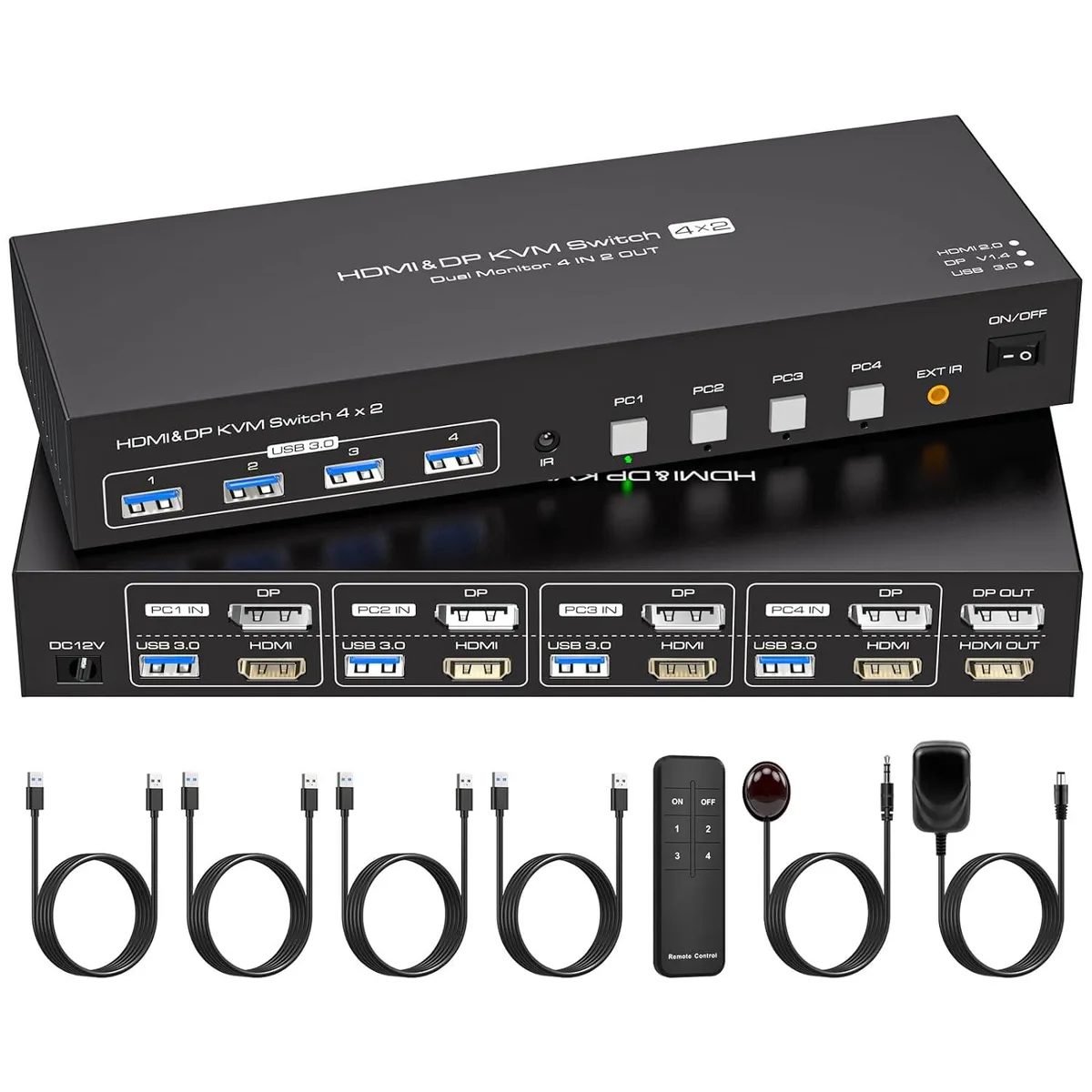
LUOM SW244-1DP1HD KVM Switch 4 Computers 2 Monitors 4K 60Hz HDMI 2.0 DP 1.4 USB 3.0
Controls four computers across two monitors at 4K 60 Hz with HDMI 2.0 and DisplayPort 1.4 plus four USB 3.0 ports
- TypeHDMI, DisplayPort, USB
- PC ConnectorsHDMI+DP+USB
- Computer Connections4 Port - USB 3.0 HDMI+DP
- Monitor Connections2 Ports
- Video Resolution4K 60Hz
- PC SelectionPush Buttons/Desktop Controller
- Control four computers with one keyboard and mouse
- Dual 4K 60Hz monitors via HDMI 2.0 and DP 1.4
- Four USB 3.0 ports share peripherals across all systems
- Push-button, remote or auto-scan switching in 3 seconds
- Compact 5.43 x 5.35 x 1.46 inch design with external power
Dual-Monitor KVM for Four Computers
The LUOM SW244-1DP1HD lets one keyboard, mouse and two displays control four separate computers. Each system connects through both HDMI and DisplayPort, while four USB 3.0 ports share peripherals across all machines. It is built for users who need simultaneous access to multiple workstations without extra cables.
Suits multi-system desks, not single-PC setups
Ideal for operators, developers or streamers running several PCs side by side and wanting instant switching via front button or infrared remote. Buyers who only own one computer, or whose machines lack both HDMI and DisplayPort outputs, will not benefit from this device.
Driver-free setup with external power
Plug the included 12V adapter, connect the supplied cables, and the switch works immediately on Windows, Mac, Linux or Unix. The most common issue is attempting 4K60 without certified HDMI 2.0 cables on both the computer and monitor sides, which prevents the highest resolution from appearing.
Highlights
- Control four computers with one keyboard and mouse
- Dual 4K 60Hz monitors via HDMI 2.0 and DP 1.4
- Four USB 3.0 ports share peripherals across all systems
- Push-button, remote or auto-scan switching in 3 seconds
- Compact 5.43 x 5.35 x 1.46 inch design with external power
Specifications
| Brand | LUOM |
|---|---|
| Series | SW244-1DP1HD |
| Model | SW244-1DP1HD |
| Type | HDMI, DisplayPort, USB |
| PC Connectors | HDMI+DP+USB |
| Computer Connections | 4 Port - USB 3.0 HDMI+DP |
| Monitor Connections | 2 Ports |
| Video Resolution | 4K 60Hz |
| PC Selection | Push Buttons/Desktop Controller |
| AutoScan Interval | 3 seconds |
| LED Indicators | Yes |
| USB Features | with USB support |
| Application | [HDMI DisplayPort KVM USB switch dual monitor]: KVM Switch allows control 4 computer with one set of controls (keyboard and mouse) and two display screen. Realizes 4 in and 2 out free selection synchronous switching. You can centrally control and manage hosts laptop or game console without having to move from one workstation to another. ? |
| Features | KVM Switch Dual Monitor 4 In 2 Out: This HDMI DisplayPort KVM Switch Dual Monitor helps you seamless connectivity and control 4 Computers and 2 monitors, all while sharing one set of USB keyboard and mouse. With just one simple key switch, you can easily toggle between 4*USB3.0 input devices without interruption to your workflow.Monitors ? Ultra HD 4K 60Hz KVM Switch: This HDMI+DisplayPort KVM switch Dual Monitor supports resolutions up to 3840*2160@60Hz and downward compatible supports 3D,HDR,HDCP.Picture quality is transmitted without delay, resulting in a more realistic and high-d |
| Dimensions | 5.43 x 5.35 x 1.46 inches |
| Weight | 9.52 Ounces |
| Package Contents | The package includes 1*4 in 2 out KVM switcher, 4*USB 3.0 A to A cables, 1*12V1A external power adapter, 1* IR cable, 1*remote control (batteries not included), and 1*user manual. |
Questions about this item
Does each of my four computers need both an HDMI 2.0 port and a DisplayPort 1.4 output to use this switch?
Yes, every connected computer must provide one HDMI 2.0 and one DisplayPort 1.4 signal for the dual-monitor KVM to function.
Will my existing 1080p and 2K monitors work with this 4K 60 Hz KVM without manual configuration?
The unit is backward compatible with 1080p, 720p and 2K 120 Hz displays and requires no driver installation.
How can I confirm the switch is delivering 4K 60 Hz to both screens after I connect everything?
Check each monitor’s on-screen information menu; both should report 3840 x 2160 at 60 Hz when the source computers are set to that resolution.
Also in this aisle
People compared these
Same shelf, same checkout — eight coins and a 30-minute rate lock.


Black Box Corporation
Black Box Corporation 4K60 HDMI Dual-Head KVM Switch 4 Port
$774.99
0.00927876BTC
In stock