


LORDWORLD
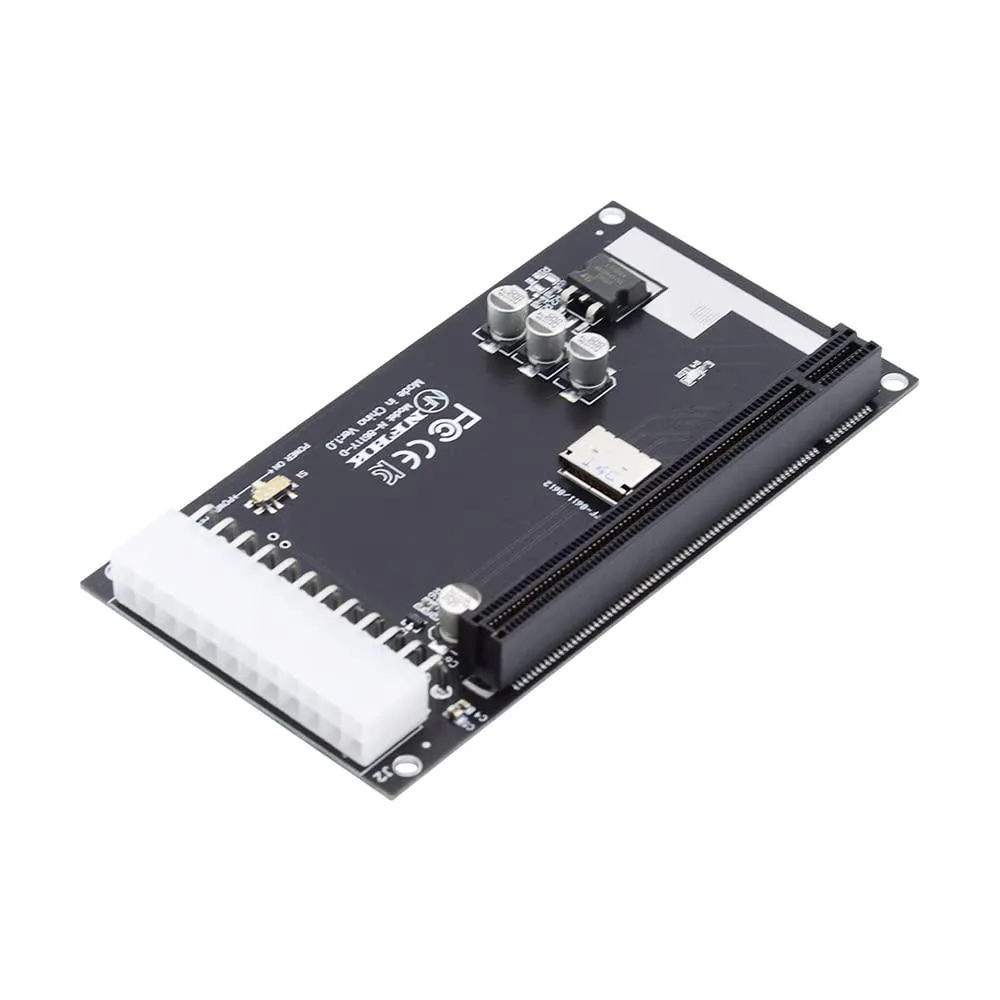
LORDWORLD Oculink SFF-8612 SFF-8611 to PCIe 16x Adapter with ATX 24pin Power Port
Connects a PCIe 16x card via Oculink SFF-8611 or SFF-8612 with a 24-pin ATX power port for 12 V auxiliary power
- Connect any standard PCIe 16x, 8x or 4x card via Oculink
- Power demanding graphics cards with the on-board ATX 24-pin 12 V connector
- Install internally using SFF-8611 or SFF-8612 Oculink interface
- Supports USB, LAN, 1394, audio and GPU expansion cards
- Compact small-form-factor Oculink 4x design for space-constrained builds
Oculink SFF-8611/8612 to PCIe 16x adapter
This adapter connects a single PCIe 16x or 4x device through an internal Oculink SFF-8611 or SFF-8612 interface. It supports standard expansion cards such as USB, LAN, 1394, audio and graphics cards. The board includes an ATX 24-pin power port with a switch to supply auxiliary 12V power when the slot alone cannot meet the card's demand.
Connection interface decides compatibility
The adapter requires an available Oculink SFF-8611 or SFF-8612 port on the host system. Only one PCIe 16x or 4x device can be attached at a time. Systems without an Oculink header cannot use this converter, so builders needing a different host interface must select another solution.
Thermals noise and power draw
The adapter itself is a passive circuit board with no fan or active cooling, so it adds no audible noise. Power consumption is limited to the attached PCIe card plus any overhead from the voltage regulation circuitry. The ATX 24-pin connector delivers supplemental 12V current directly to the card when the onboard switch is enabled.
Highlights
- Connect any standard PCIe 16x, 8x or 4x card via Oculink
- Power demanding graphics cards with the on-board ATX 24-pin 12 V connector
- Install internally using SFF-8611 or SFF-8612 Oculink interface
- Supports USB, LAN, 1394, audio and GPU expansion cards
- Compact small-form-factor Oculink 4x design for space-constrained builds
Specifications
| Brand | LORDWORLD |
|---|
Questions about this item
What does the PCIe 16x slot actually deliver when connected through the Oculink 4x link?
The adapter provides a physical PCIe 16x slot, but the Oculink SFF-8611/8612 interface carries four lanes, so the connected card runs at PCIe 4x electrical speed.
Which Oculink connector standard does this adapter use and what bandwidth does it provide?
It uses SFF-8611 and SFF-8612 connectors for a 4-lane Oculink link, limiting the connected device to PCIe 4x throughput.
What power connections are required to run a graphics card on this adapter?
The board includes a 24-pin ATX power port with a 12 V supply switch; plug the ATX connector and use the switch to feed auxiliary power to the PCIe card.
Also in this aisle
People compared these
Same shelf, same checkout — eight coins and a 30-minute rate lock.



SXDOOL
SXDOOL Lenovo X1 Helix UDQFTYH11BFD 0C54109 04X0431 fan heat sink cooling module
$32.99
0.00039498BTC
In stock
Panasonic
Panasonic CF-VDL03UKB 12.1 inch PDRC touchscreen backlit keyboard gadget
$1,521.99
0.01822241BTC
In stock