


LORDWORLD
LORDWORLD 2 Port 8K HDMI KVM Switch 8K@60Hz 4K@120Hz 4 USB 3.0
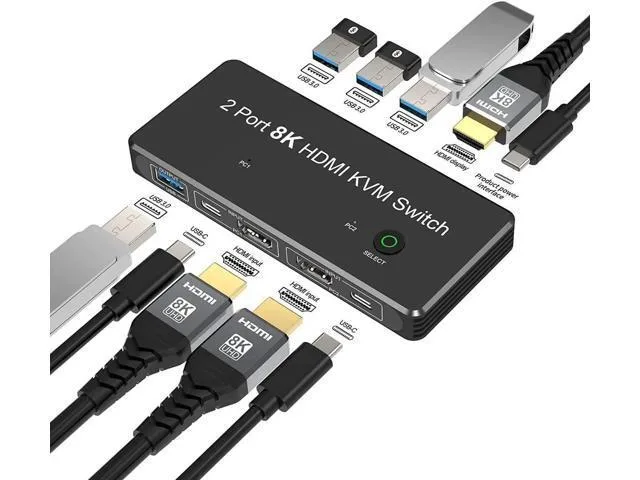
Share two computers with one 8K monitor, keyboard, mouse and four USB 3.0 devices using a single button
- Share one monitor, keyboard and mouse between two computers
- 8K resolution at 60 Hz with HDMI 2.1 48 Gbps bandwidth
- 4K gaming at 120 Hz for smooth high-refresh play
- Four USB 3.0 ports share peripherals and storage at 5 Gbps
- Switch instantly with a single button press
Two-Port 8K HDMI KVM Switch
This new LORDWORLD KVM switch lets two computers share one monitor, a keyboard, a mouse and up to four USB 3.0 peripherals. It handles video up to 8K at 60 Hz and 4K at 120 Hz over HDMI 2.1 with 48 Gbps bandwidth. A single button toggles the active host instantly.
Desktop users who need dual-system access on one
The switch suits home-office workers, developers or gamers who alternate between a work laptop and a desktop PC without unplugging cables. It does not serve setups that require more than two video sources or buyers who need DisplayPort or USB-C video inputs.
48 Gbps HDMI 2.1 bandwidth
This single figure decides whether the switch can carry the 8K 60 Hz or 4K 120 Hz signals your monitors and graphics cards expect. If your cabling or source devices are limited to lower bandwidth, the switch will still operate at the highest common rate.
Highlights
- Share one monitor, keyboard and mouse between two computers
- 8K resolution at 60 Hz with HDMI 2.1 48 Gbps bandwidth
- 4K gaming at 120 Hz for smooth high-refresh play
- Four USB 3.0 ports share peripherals and storage at 5 Gbps
- Switch instantly with a single button press
Specifications
| Brand | LORDWORLD |
|---|
Questions about this item
Which cables do I need to connect two PCs to the two HDMI inputs and the USB-C data ports?
You need two HDMI 2.1 cables for the video inputs and two USB-C cables for the data ports on the front.
Will my older 1080P monitor at 120Hz work with the 8K@60Hz and 4K@120Hz capabilities?
Yes, the switch supports 1080P@120Hz so your monitor will run at its native refresh rate.
How can I verify the switch is passing 8K@60Hz 4:4:4 correctly after setup?
Check your display settings show 7680x4320 at 60Hz with 10-bit or 12-bit colour depth and 4:4:4 chroma.
Also in this aisle
People compared these
Same shelf, same checkout — eight coins and a 30-minute rate lock.


Black Box Corporation
Black Box Corporation 4K60 HDMI Dual-Head KVM Switch 4 Port
$774.99
0.00932274BTC
In stock