

Max Cases
Max Cases Shield Extreme-X2 tablet accessory for iPad 10/11 10.9
$40.99
0.00048803BTC
In stockWe take cryptocurrency — so the coins you hold can buy real hardware.Pay in crypto, spend it on real hardware. Free insured shipping worldwide over $399. Plain, unbranded boxes, sent from Germany.Free insured shipping over $399. Your rate is locked for 30 minutes once checkout opens.Rate locked 30 minutes. Every item sealed, serial-checked and covered by a 24-month warranty.Sealed, 24-month warranty.
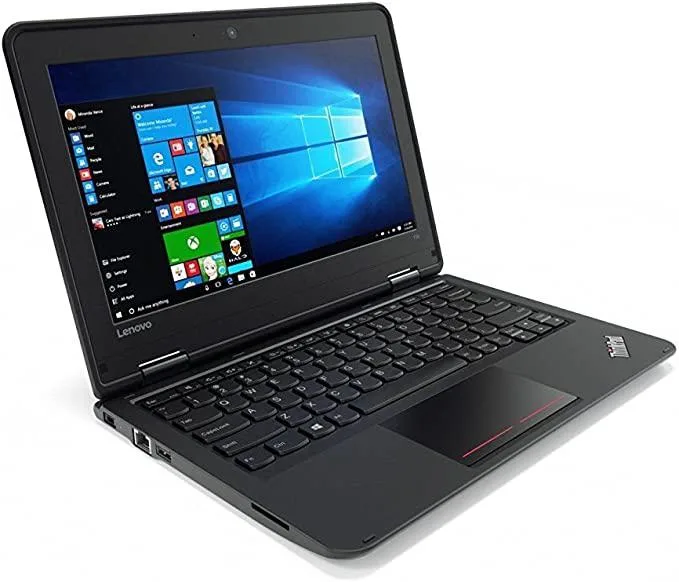


Lenovo
An 11.6-inch touchscreen tablet with an Intel Pentium 4405U processor, 4GB DDR3L memory and a 128GB SATA SSD
The Lenovo Yoga 11e 3rd Gen is an 11.6-inch convertible tablet built for classroom use. It runs on an Intel Pentium 4405U processor with 4GB of DDR3L memory and a 128GB SSD. Windows 10 Pro 64-bit comes pre-installed.
This device fits students and mobile workers who need a touchscreen for web browsing, document editing and video playback. Buyers who want more storage or memory for demanding creative applications should look elsewhere.
The solid-state drive boots Windows rapidly and holds thousands of documents or photos. Large media libraries or modern game installations will exceed the available space quickly.
| Screen Size | 11.6" |
|---|
It ships with Windows 10 Pro 64-bit already installed and reset to factory defaults, so you can begin setup as soon as you power it on.
The system uses DDR3L SO-DIMM memory; the 4GB module inside is soldered, so there is no free slot for additional DDR3L sticks.
Open Settings > System > Storage and confirm the drive shows roughly 128GB capacity; then run the built-in Windows drive-health check or a quick chkdsk to verify integrity.
Also in this aisle
Same shelf, same checkout — eight coins and a 30-minute rate lock.
What you pay in, and what you read prices in.
Sent from your wallet at checkout
Display only — the catalogue is priced in USD
No currency matches that.
New here?
Already have one?
There is no automatic reset: this shop sends no mail, so there is no one-time link to ask for. Leave the address on the account and it gets picked up by hand.
Request noted
Nothing is on its way to your inbox — this shop sends no mail at all. Someone picks these up by hand.
Remembered it?


