


Jansicotek
Jansicotek SW244-1DP1HD 4-Port Dual-Monitor KVM Switch 4K 60Hz
Controls four computers with one keyboard, mouse and two monitors at 4K 60 Hz, plus four USB 3.0 ports for peripherals
- TypeHDMI, DisplayPort, USB
- PC ConnectorsHDMI+DP+USB
- Computer ConnectionsHDMI+DP
- Monitor Connections2 Ports
- Video Resolution4K 60Hz
- PC SelectionPush Buttons/Desktop Controller
- Controls four computers with one keyboard and mouse set
- Drives two monitors at 4K 60 Hz from HDMI 2.0 and DP 1.4 inputs
- Four USB 3.0 hub ports share peripherals at up to 5 Gbps
- Switch sources via front buttons, desktop controller or IR remote
- Plug-and-play across Windows, macOS, Linux and Unix
4-Port Dual-Monitor KVM Switch
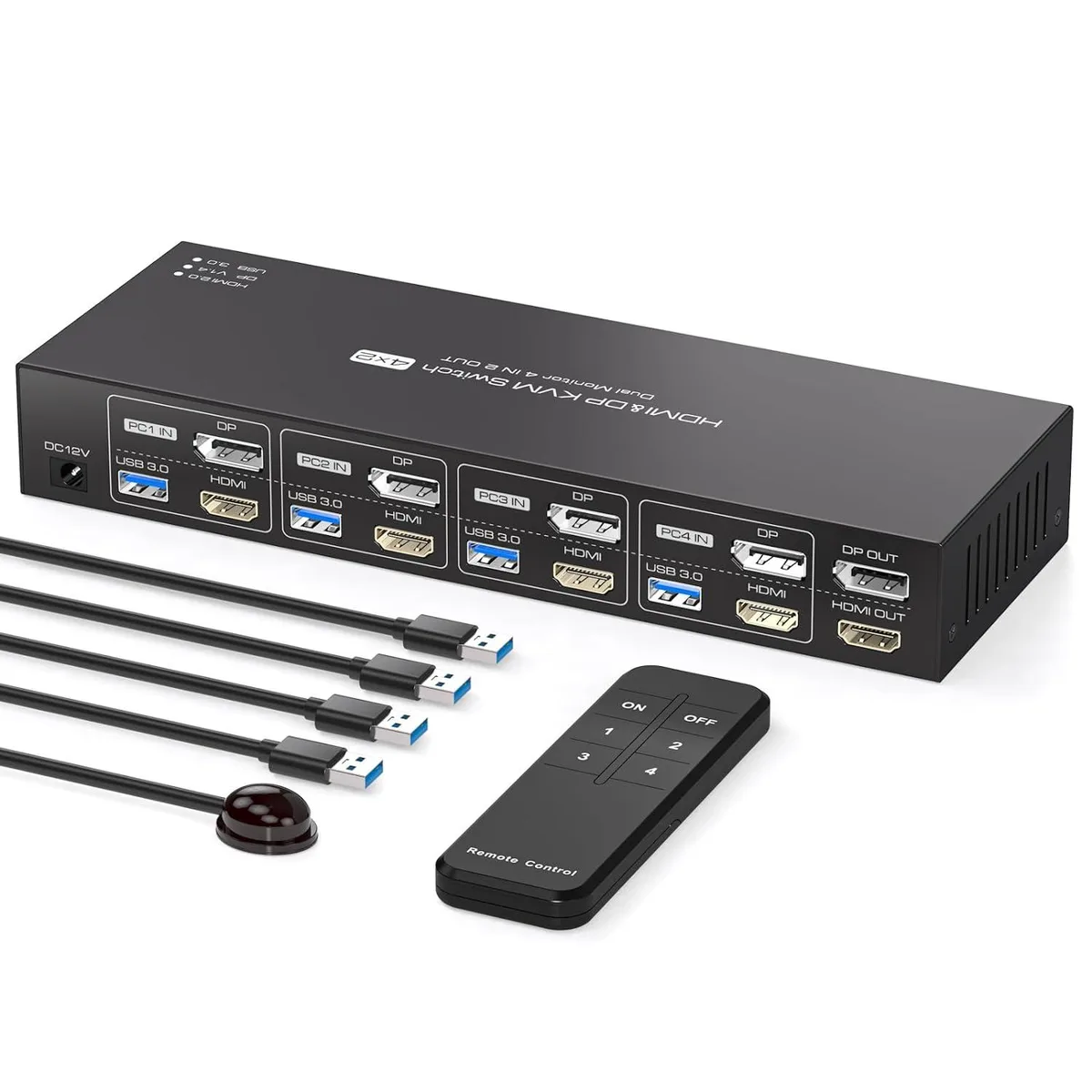
The Jansicotek SW244-1DP1HD connects four computers to two monitors and one keyboard-and-mouse set. It handles HDMI and DisplayPort inputs on each PC port and provides two video outputs for extended or duplicate desktop modes. Four USB 3.0 hub ports let you share peripherals such as printers or scanners across all connected systems. The unit is designed for users who need simultaneous access to multiple workstations without swapping cables.
Front-panel buttons and included IR remote
Push buttons on the device and a desktop controller give instant source selection, while an IR receiver cable allows switching from a distance. LED indicators show the active port at a glance. The metal enclosure measures 5.43 by 5.35 by 1.46 inches and weighs 9.52 ounces, so it sits neatly on a desk. A 12 V 1 A external power adapter is supplied for stable operation.
Check your computers and cables before ordering
Every connected PC must support dual-display output and extended desktop mode. Both monitors and all cables must be rated for 4K at 60 Hz, meaning HDMI 2.0 or DisplayPort 1.4 links. The switch is compatible with Windows, macOS, Linux and Unix, but each host needs one HDMI, one DisplayPort and one USB port for the KVM links. No drivers are required.
Highlights
- Controls four computers with one keyboard and mouse set
- Drives two monitors at 4K 60 Hz from HDMI 2.0 and DP 1.4 inputs
- Four USB 3.0 hub ports share peripherals at up to 5 Gbps
- Switch sources via front buttons, desktop controller or IR remote
- Plug-and-play across Windows, macOS, Linux and Unix
Specifications
| Brand | Jansicotek |
|---|---|
| Series | SW244-1DP1HD |
| Model | SW244-1DP1HD |
| Type | HDMI, DisplayPort, USB |
| PC Connectors | HDMI+DP+USB |
| Computer Connections | HDMI+DP |
| Monitor Connections | 2 Ports |
| Video Resolution | 4K 60Hz |
| PC Selection | Push Buttons/Desktop Controller |
| AutoScan Interval | 3 seconds |
| LED Indicators | Yes |
| USB Features | with USB support |
| Application | [HDMI DisplayPort KVM USB switch dual monitor]: KVM Switch allows control 4 computer with one set of controls (keyboard and mouse) and two display screen. Realizes 4 in and 2 out free selection synchronous switching. You can centrally control and manage hosts laptop or game console without having to move from one workstation to another. ? |
| Features | KVM Switch Dual Monitor 4 In 2 Out: This HDMI DisplayPort KVM Switch Dual Monitor helps you seamless connectivity and control 4 Computers and 2 monitors, all while sharing one set of USB keyboard and mouse. With just one simple key switch, you can easily toggle between 4*USB3.0 input devices without interruption to your workflow.Monitors ? Ultra HD 4K 60Hz KVM Switch: This HDMI+DisplayPort KVM switch Dual Monitor supports resolutions up to 3840*2160@60Hz and downward compatible supports 3D,HDR,HDCP.Picture quality is transmitted without delay, resulting in a more realistic and high-d |
| Dimensions | 5.43 x 5.35 x 1.46 inches |
| Weight | 9.52 Ounces |
| Package Contents | The package includes 1*4 in 2 out KVM switcher, 4*USB 3.0 A to A cables, 1*12V1A external power adapter, 1* IR cable, 1*remote control (batteries not included), and 1*user manual. |
Questions about this item
What HDMI and DisplayPort standards does the SW244-1DP1HD support, and what resolution does that cap at?
The switch supports HDMI 2.0 and DisplayPort 1.4, both backwards compatible, allowing dual-monitor output up to 4K at 60 Hz.
What cables and space are needed to fit the SW244-1DP1HD on a desk?
It measures 5.43 by 5.35 by 1.46 inches and weighs 9.52 ounces; the box includes four USB 3.0 A-to-A cables, a 12 V 1 A power adapter, an IR cable and a remote, so you only need two HDMI and two DisplayPort cables per computer.
How is the SW244-1DP1HD installed, and which step do people often miss?
Connect each computer's HDMI, DisplayPort and USB cables to the rear ports, attach both monitors, plug in the 12 V power adapter, then press the front buttons or use the IR remote to select inputs; the step often missed is ensuring every PC is set to extended-display mode before switching.
Also in this aisle
People compared these
Same shelf, same checkout — eight coins and a 30-minute rate lock.


Black Box Corporation
Black Box Corporation 4K60 HDMI Dual-Head KVM Switch 4 Port
$774.99
0.00922706BTC
In stock