


Jansicotek
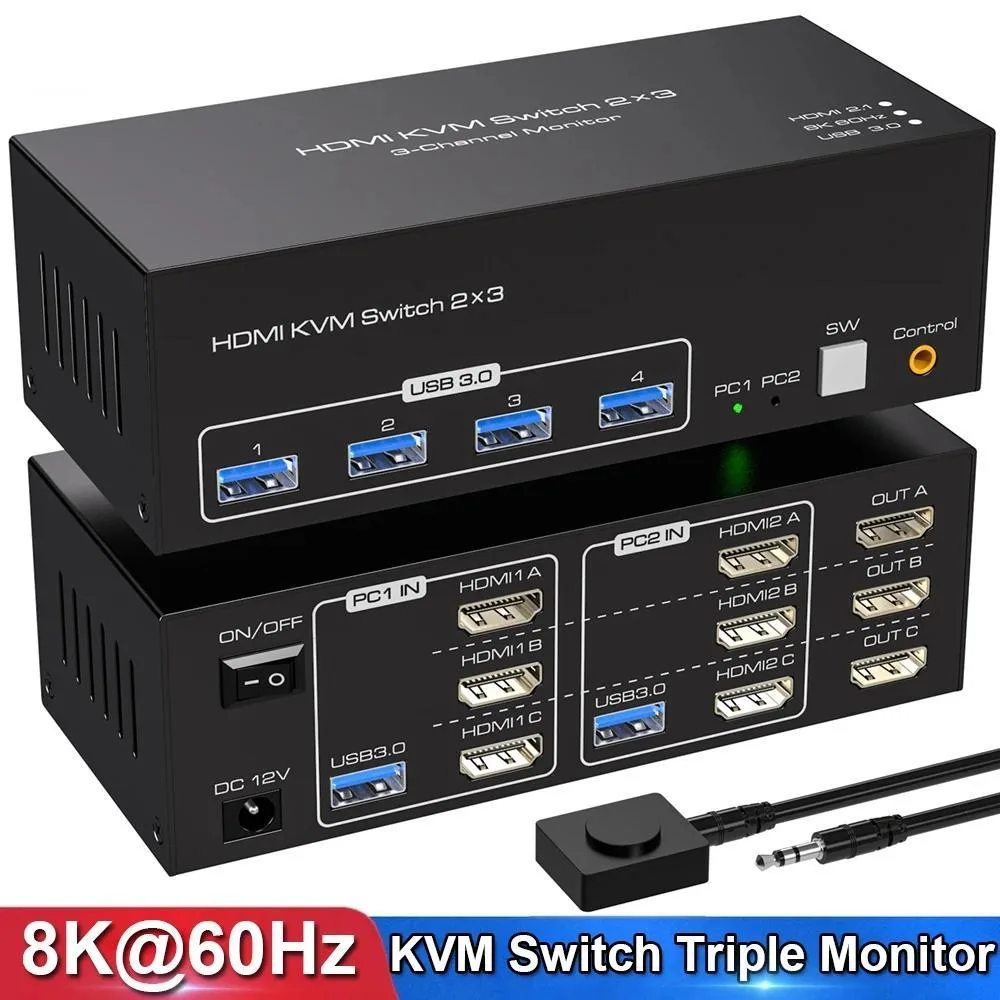
Jansicotek SW231-3HD 8K 60 Hz triple-monitor KVM switch 2 PCs 3 displays
Share two computers across three HDMI monitors at up to 8K 60 Hz with four USB 3.0 ports and a wired desktop controller
- TypeHDMI, USB
- PC ConnectorsHDMI and USB
- Computer Connections3 Ports
- Monitor Connections3 Ports
- Video Resolution8K 60Hz
- PC SelectionPush Buttons/Desktop Controller
- Control two PCs with one keyboard and mouse
- Share three monitors across both computers at 8K 60 Hz
- Switch between extended and duplicate display modes instantly
- Connect four USB 3.0 peripherals to either system
- Switch via front buttons or wired desktop controller
Triple-monitor KVM for two PCs
The Jansicotek SW231-3HD lets two desktops or laptops share three HDMI monitors and four USB 3.0 ports with a single keyboard and mouse. Each computer must support three or more screens to use extended or duplicate display modes. The switch handles video and peripheral routing without software drivers.
8K 60 Hz HDMI 2.1 upgrade
This unit replaces simpler two-monitor or 4K-limited switches when you need three simultaneous 8K 60 Hz outputs and HDMI 2.1 bandwidth. The jump is worth it if your GPUs and monitors all support 8K 60 Hz or 4K 120 Hz and you want one USB 3.0 hub for both systems.
HDMI 2.1 and HDCP 2.3 limits
HDMI 2.1 carries the 8K 60 Hz signal, but cable length and monitor handshake can reduce the practical resolution. HDCP 2.3 protects premium content, yet some older sources or sinks may fall back to lower modes. The 12 V 1 A supply keeps the USB 3.0 hub stable, but total peripheral draw must stay within that budget.
Highlights
- Control two PCs with one keyboard and mouse
- Share three monitors across both computers at 8K 60 Hz
- Switch between extended and duplicate display modes instantly
- Connect four USB 3.0 peripherals to either system
- Switch via front buttons or wired desktop controller
Specifications
| Brand | Jansicotek |
|---|---|
| Series | SW231-3HD |
| Model | SW231-3HD |
| Type | HDMI, USB |
| PC Connectors | HDMI and USB |
| Computer Connections | 3 Ports |
| Monitor Connections | 3 Ports |
| Video Resolution | 8K 60Hz |
| PC Selection | Push Buttons/Desktop Controller |
| AutoScan Interval | 3 seconds |
| LED Indicators | Yes |
| USB Features | with USB support |
| Application | KVM Switch 3 Monitors 2 Computers: This HDMI KVM Switch 2 port connects 2 desktops or laptops to share 3 monitors and 4 USB 3.0 ports. You only need one set of keyboard and mouse to control all the monitors, and it supports expanding and copying displays. To expand and copy the display, each laptop/PC must support 3 or more screens and must support extended displays. 8K HDMI KVM Switch for 2 Computers Share 3 Monitors and 4 USB 3.0 devices. It is possible to control two computers and three monitors directly with one set of keyboard and mouse. Three monitors can support two modes:dupl |
| Features | 1. 2 computers/laptops share one set of keyboard, mouse, and 3 HDMI monitors 2. Triple monitors output support up to 8K@60Hz for extended and mirror display, support HDMI 2.1 and HDCP 2.3 standards. 3. 2 Switching modes: Button switch and wired remote. 4. With extra 4 x 5Gbps USB 3.0 ports . 5. Cross-support most major OS including Windows, Linux, Mac, and more. 6. The ports that need to plug in HDMI/USB cables are all hidden behind the 3 monitor kvm switch, so the desktop doesn't get cluttered, you can enjoy the clean work space. |
| Dimensions | 5.43 x 5.35 x 1.46 inches |
| Weight | 9.52 Ounces |
| Package Contents | 1x USB 3.0 3x3 HDMI Triple Monitor KVM Switch, 2x USB 3.0 Cables, 1x Power Adapter, 1x Wired Button Switch, 1x User's manual. |
Questions about this item
What desk space does the 5.43 x 5.35 x 1.46 inch unit need?
The switch occupies a 5.43 by 5.35 inch footprint and stands 1.46 inches tall, so allow that much flat space plus cable bend radius for three HDMI leads, two USB 3.0 cables and the 12 V power adapter.
Which cable goes where during setup, and what step do users miss?
Connect each PC with one HDMI cable and one USB 3.0 cable to the matching numbered ports, plug the three monitors into the three HDMI outputs, attach the 12 V/1 A power supply, then press the desktop controller to confirm both computers recognise all three displays — the step often missed is powering the unit before booting the PCs.
When should the 12 V/1 A power adapter be replaced?
Replace the adapter if the switch loses video on one or more monitors, USB 3.0 devices disconnect under load, or the LED indicators flicker, as these signal the 1 A supply can no longer sustain the 8K 60 Hz throughput and four downstream USB ports.
Also in this aisle
People compared these
Same shelf, same checkout — eight coins and a 30-minute rate lock.


Black Box Corporation
Black Box Corporation 4K60 HDMI Dual-Head KVM Switch 4 Port
$774.99
0.00922706BTC
In stock