


Jansicotek
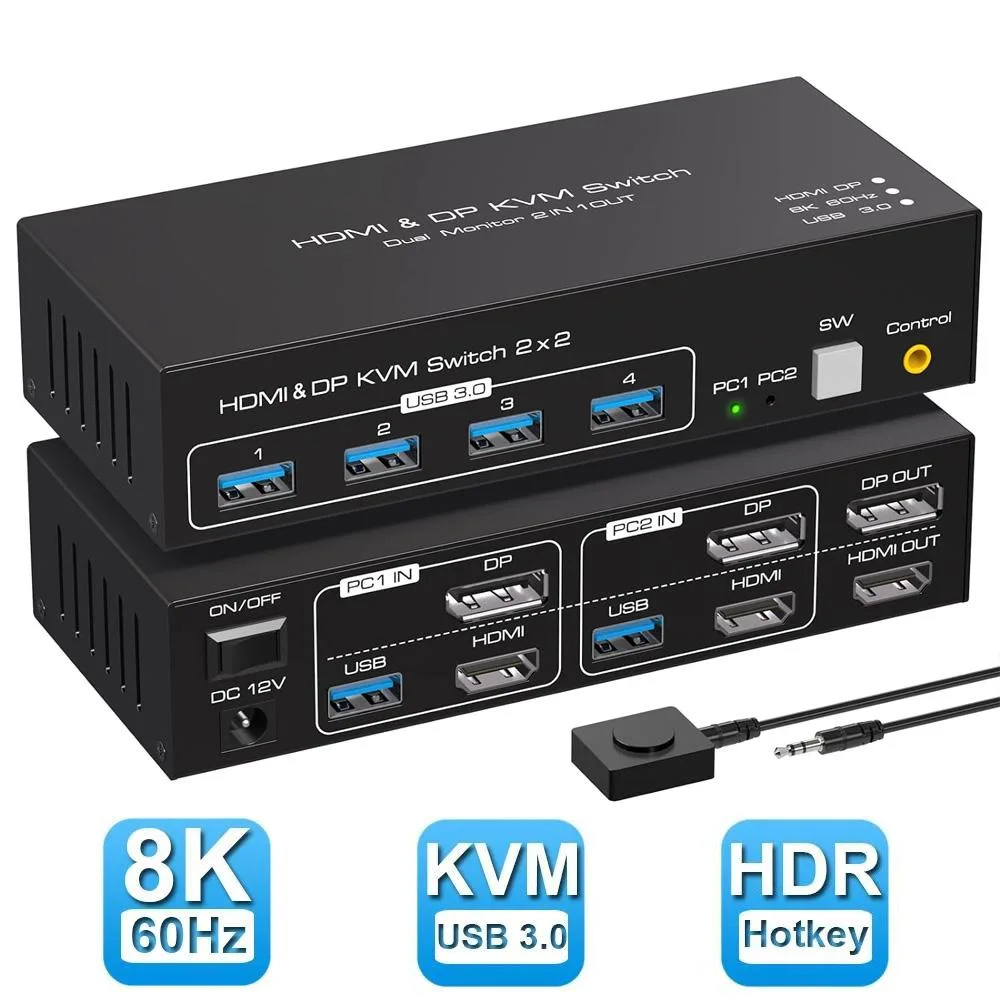
Jansicotek SW222-1DP1HD 2-Port Dual Monitor KVM Switch HDMI 2.1 DP 1.4 8K60Hz
Share one keyboard, mouse and two monitors across two computers with 8K 60 Hz, 4K 120 Hz and four USB 3.0 ports
- TypeHDMI DP USB
- PC ConnectorsHDMI DP USB
- Computer Connections2 Ports
- Monitor Connections2 Ports
- Video Resolution8K 60Hz
- PC SelectionPush Buttons/Desktop Controller
- Share two computers across dual monitors with 8K 60Hz clarity
- Switch instantly via front buttons or wired remote in 3-second auto-scan
- Connect four USB 3.0 peripherals at 5Gbps through built-in hub
- Run extended or mirrored desktops on HDMI 2.1 and DP 1.4 inputs
- Works plug-and-play with Windows, Mac, Linux and Unix systems
Dual-Monitor KVM for Two Computers
The Jansicotek SW222-1DP1HD lets two PCs, laptops or consoles share one keyboard, one mouse and two displays. Each system connects through HDMI 2.1 and DisplayPort 1.4 inputs while the console side provides one HDMI and one DP output. Extended and mirror modes are both supported for flexible desktop layouts.
Front-Panel Buttons and Wired Remote
A push-button panel and a separate wired controller give instant source switching without software. Four USB 3.0 hub ports at 5Gbps accommodate keyboards, mice, scanners, drives or printers. Semi-DDM pass-through preserves advanced keyboard and mouse functions. LED indicators show the active channel at a glance.
Resolution Limits and Auto-Scan Timing
The switch tops out at 8K 60Hz, with 4K 120Hz, 2K 144Hz and 1080p 240Hz also available. HDCP 2.3 is supported for protected content. Auto-scan cycles every 3 seconds when enabled. Buyers who need more than two computer ports or additional monitor outputs cannot use this unit.
Highlights
- Share two computers across dual monitors with 8K 60Hz clarity
- Switch instantly via front buttons or wired remote in 3-second auto-scan
- Connect four USB 3.0 peripherals at 5Gbps through built-in hub
- Run extended or mirrored desktops on HDMI 2.1 and DP 1.4 inputs
- Works plug-and-play with Windows, Mac, Linux and Unix systems
Specifications
| Brand | Jansicotek |
|---|---|
| Series | SW222-1DP1HD |
| Model | SW222-1DP1HD |
| Type | HDMI DP USB |
| PC Connectors | HDMI DP USB |
| Computer Connections | 2 Ports |
| Monitor Connections | 2 Ports |
| Video Resolution | 8K 60Hz |
| PC Selection | Push Buttons/Desktop Controller |
| AutoScan Interval | 3 seconds |
| LED Indicators | Yes |
| USB Features | with USB support |
| Features | 2 In 2 Out 4K 120Hz USB 3.0 HDMI DP KVM Switch Box dual monitor for 2 PC Sharing Keyboard Mouse Printer Plug Play Video 2 Display USB Switch Splitter - Product Type: 8K HDMI DP USB 3.0 KVM Switch (2 in 2 out) - Input Port: HDMI 2.1, DP 1.4 ,USB 3.0 data x2, USB 3.0 x 4 - Output Port: HDMI 2.1, DP 1.4 - Dimensions: 150x65x35mm - Material: Aluminum Alloy shellanti-rust, anti-corrosion, anti-interference, fast transmission, surtace oxidation Features - Support HDMI 2.1 HDCP 2.3 / Displayport 1.4 - Resolution: Support 1080P/1080@144/165/240Hz, 2K@120/144Hz, 4K@60/120Hz,8K@60Hz resolution |
| Dimensions | 5.43 x 5.35 x 1.46 inches |
| Weight | 9.52 Ounces |
| Package Contents | 1 x HDMI DP KVM USB Switch, 2 x USB 3.0 data cable, 1x DC power adapter,1 x User Manual. |
Questions about this item
What does the HDMI 2.1 and DP 1.4 interface support in practice?
The switch passes 8K at 60 Hz, 4K at 120 Hz, 2K at 144 Hz, and 1080p at up to 240 Hz or 165 Hz depending on the source.
What physical space and connections does the unit need to fit and mount?
It measures 5.43 by 5.35 by 1.46 inches and weighs 9.52 ounces; it requires two HDMI, two DisplayPort, and USB 3.0 cables to each computer plus a DC power adapter.
How is the KVM installed and which step do people often get wrong?
Connect both computers using the supplied USB 3.0 data cables, attach one HDMI and one DisplayPort monitor, plug in the power adapter, then use the front buttons or wired remote to switch — forgetting the external power adapter is the common mistake.
Also in this aisle
People compared these
Same shelf, same checkout — eight coins and a 30-minute rate lock.


Black Box Corporation
Black Box Corporation 4K60 HDMI Dual-Head KVM Switch 4 Port
$774.99
0.00929323BTC
In stock