


Jansicotek
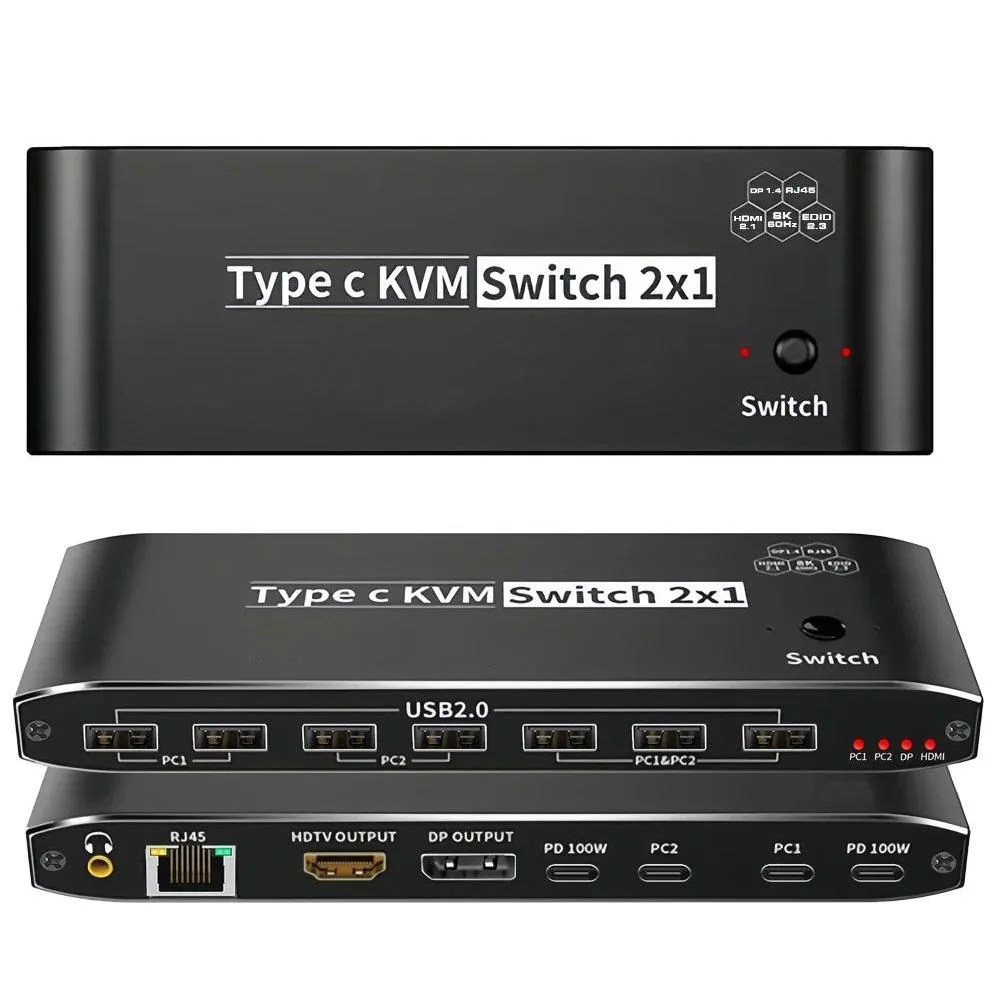
Jansicotek OZK8 8K USB-C KVM Switch 100W PD 7 USB 2.0 RJ45 3.5mm
Controls two USB-C computers with one 8K monitor, seven USB 2.0 devices, Ethernet and audio while delivering 100 W charging
- TypeUSB C
- PC ConnectorsUSB-C
- Computer Connections2 Ports
- Monitor Connections1 Port
- Video Resolution7680*4320
- PC SelectionPush Buttons
- Share one monitor between two computers via USB-C
- Charge a connected laptop with up to 100W Power Delivery
- Connect seven USB 2.0 peripherals that switch with the PC
- Add wired network and 3.5 mm audio through the switch
- Switch sources instantly using the front-panel button
Two-PC 8K KVM Switch
The Jansicotek OZK8 is a USB-C KVM switch that lets two computers share one DisplayPort 1.4 or HDMI 2.1 monitor, seven USB 2.0 peripherals, a 3.5 mm audio jack and a single RJ45 network connection. It supports video resolutions up to 7680×4320 at 60 Hz with DSC and 4K at 120 Hz or 144 Hz. A push-button on the unit toggles the active computer and the auto-scan interval is three seconds.
Setup checks before ordering
Both computers must provide a USB-C port that carries DisplayPort Alt Mode and accepts up to 100 W Power Delivery; the switch draws its operating power from the included USB-C to USB-A cable. You will need your own DisplayPort 1.4 or HDMI 2.1 cable between the switch and the monitor. The seven downstream ports are USB 2.0 only, so high-speed storage or 10 Gbps devices will run at 480 Mbps. The RJ45 link is 100 Mbps, not Gigabit.
Sustained-load behaviour
Under continuous use the switch delivers 100 W PD to the active laptop, keeping it charged during long sessions. Video bandwidth remains at the full HDMI 2.1 48 Gbps or DP 1.4 32.4 Gbps specification, so 8K 60 Hz DSC and 4K 144 Hz DSC stay stable without frame drops. USB 2.0 peripherals and the 100 Mbps network link maintain consistent throughput because the internal hub does not renegotiate on every switch event.
Highlights
- Share one monitor between two computers via USB-C
- Charge a connected laptop with up to 100W Power Delivery
- Connect seven USB 2.0 peripherals that switch with the PC
- Add wired network and 3.5 mm audio through the switch
- Switch sources instantly using the front-panel button
Specifications
| Brand | Jansicotek |
|---|---|
| Series | OZK8 |
| Model | OZK8 |
| Type | USB C |
| PC Connectors | USB-C |
| Computer Connections | 2 Ports |
| Monitor Connections | 1 Port |
| Video Resolution | 7680*4320 |
| PC Selection | Push Buttons |
| AutoScan Interval | 3 seconds |
| LED Indicators | Yes |
| USB Features | with USB support |
| Application | Widely used in many occasions:Our This USB-C Switch is easy to use and can be widely used in Studying, Entertainment, Work and other Occasions, ultra-High-Definition Smooth Video and Picture Quality Experience, Multi-source Switching, providing multiple possibilities for work and entertainment |
| Features | 2 x USB-C 8K KVM Switch with one DisplayPort 1.4 or HDMI 2.1 Port for Video,with this 2 Port 8K KVM Switcher,you are able to connect from the switcher's two PC Input Port to your USB-C PC/Laptops via two standard USB-C Gen-2 Cable,then connect from the switcher's Standard DP 1.4 /HDMI 2.1 port to your Monitors via your own displayport 8K Standard Cable,you can press the "Switch"button to switch between two of your PCs. 2in 1out USB C KVM 8K Switcher: 2 x USB-C PC Input Ports, 2 x 100W PD Charge 1 x RJ45,two computers online at the same time 1 x 3.5mm jack,audio extractor 7x USB Ports |
| Dimensions | 5.43 x 5.35 x 1.46 inches |
| Weight | 9.52 Ounces |
| Package Contents | 1 x USB C Thunderbolt 4 KVM Switch 2 x 1.2 meter USB Gen 2 Cable(Type C to Type C) 1 x User Manual |
Questions about this item
What cables and accessories come with the Jansicotek OZK8, and what must I provide myself?
The box contains the KVM switch, two 1.2 meter USB-C Gen 2 cables and a user manual. You must supply your own DisplayPort 1.4 or HDMI 2.1 cable to connect the monitor.
Which video output should I choose between the DisplayPort 1.4 and HDMI 2.1 ports?
Both ports support 7680×4320 at 60 Hz with DSC; DisplayPort 1.4 offers 32.4 Gbps bandwidth while HDMI 2.1 provides 48 Gbps. Pick the one that matches your monitor’s input.
What does the 100 W Power Delivery rating mean for my laptop while the switch is in use?
Each USB-C input can deliver up to 100 W to the connected laptop, keeping it charged during long sessions. The switch itself requires power from the supplied USB-C to USB-A cable to operate.
Also in this aisle
People compared these
Same shelf, same checkout — eight coins and a 30-minute rate lock.


Black Box Corporation
Black Box Corporation 4K60 HDMI Dual-Head KVM Switch 4 Port
$774.99
0.0093196BTC
In stock