


IHDAPP
IHDAPP 4-Port Dual Monitor KVM Switch HDMI DisplayPort 8K@60Hz 4K@144Hz USB 3.0 Desktop Controller
A four-computer KVM switch shares one keyboard, mouse and dual HDMI plus DisplayPort monitors at up to 8K 60 Hz or 4K 144 Hz with front-panel buttons and a wired desktop controller
- TypeHDMI + Displayport
- Computer Connections4 Ports
- Monitor Connections2 Ports
- Video Resolutionsupport 4K@144Hz, 4K@120Hz, 4K@60Hz, 2K@144Hz, 3D, 1080P and
- PC SelectionPush Buttons and Desktop Controller
- Monitors SupportedHDMI + Displayport Dual Monitor
- Share four PCs on two monitors up to 8K@60Hz
- Switch instantly with push buttons or wired desktop controller
- Connect keyboard, mouse and three USB 3.0 peripherals plus one USB 2.0 port
- Supports DP 1.4 and HDMI 2.1 with extended, mirrored or spliced display modes
- Works with Windows, Linux, Mac, Unix and Raspberry Pi systems
Four-PC Dual-Monitor KVM
This IHDAPP KVM switch connects four computers to one HDMI plus one DisplayPort monitor and a single keyboard and mouse set. It suits multi-system workstations, streaming setups and test benches that need simultaneous access to several machines. Buyers whose laptops lack both an HDMI and a DisplayPort output cannot use the dual-display modes.
Thermals Noise Power
The unit draws power from an included 12 V DC adapter and has no internal fan, so it runs silently in normal use. Power consumption stays low because the switch only routes video and USB signals without heavy processing. No thermal throttling or audible noise occurs during typical desktop operation.
Bundled Accessories Impact
The package supplies a wired desktop controller for one-click source switching, four USB 3.0 cables for computer links and the 12 V power adapter. These items let the switch work immediately without extra purchases, though monitor cables are not included. The controller eliminates repeated reaching to the main unit, and the USB cables support 3.0 speeds for connected peripherals.
Highlights
- Share four PCs on two monitors up to 8K@60Hz
- Switch instantly with push buttons or wired desktop controller
- Connect keyboard, mouse and three USB 3.0 peripherals plus one USB 2.0 port
- Supports DP 1.4 and HDMI 2.1 with extended, mirrored or spliced display modes
- Works with Windows, Linux, Mac, Unix and Raspberry Pi systems
Specifications
| Type | HDMI + Displayport |
|---|---|
| Computer Connections | 4 Ports |
| Monitor Connections | 2 Ports |
| Video Resolution | support 4K@144Hz, 4K@120Hz, 4K@60Hz, 2K@144Hz, 3D, 1080P and 720P. |
| PC Selection | Push Buttons and Desktop Controller |
| Monitors Supported | HDMI + Displayport Dual Monitor |
| LED Indicators | Yes |
| Power Features | 12V DC power adapter |
| USB Features | with USB support |
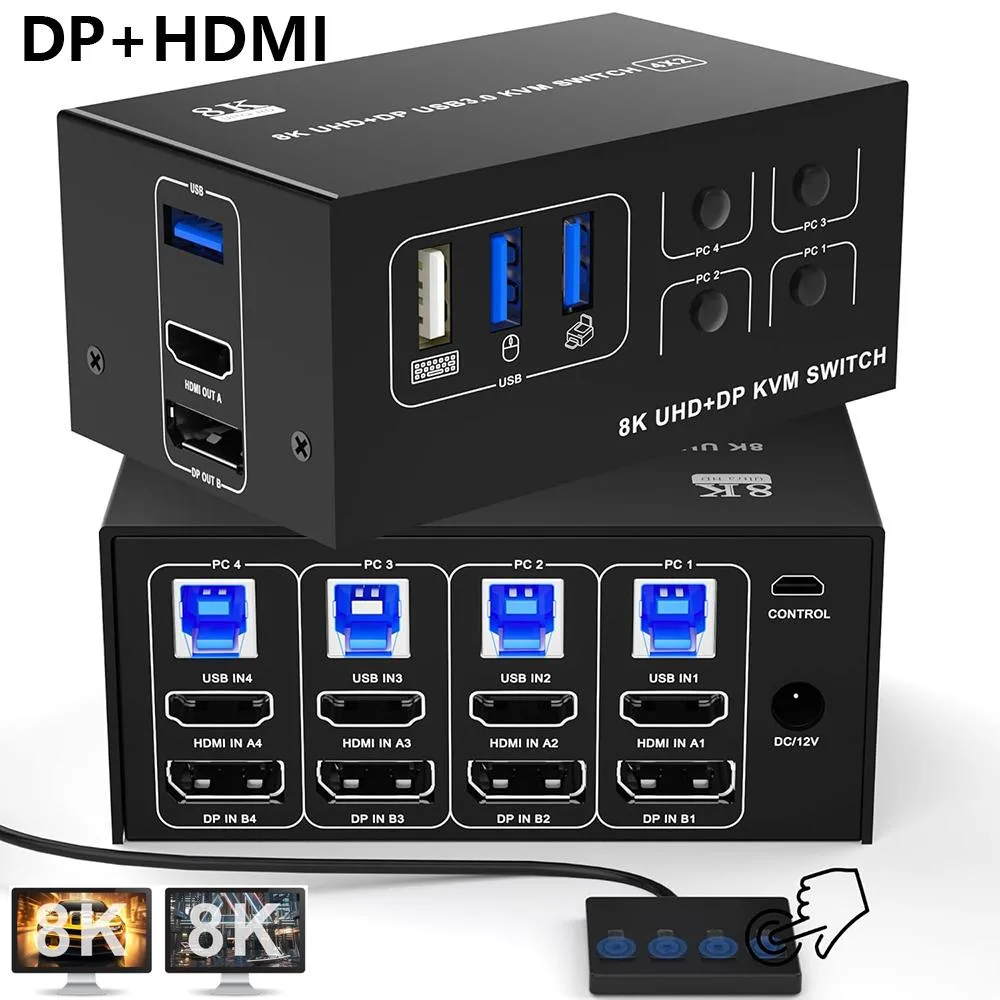
| Application | This KVM switch for 4 computers to share DP + HDMI dual monitors and one set of keyboard mouse. KVM switches support extended, copy and splicing mode. Note: Please make sure your computer/ laptop or docking stations have DP + HDMI 2 ports. KVM Switch has desktop controller, one-click switching to avoid unplugging and plugging and damaging the interface, improving work efficiency, the best choice for working at home or office |
| Features | 8K@60Hz Dual Monitor KVM Switch 4-Port allows 4 computers/laptops share one set of keyboard, mouse, and 2 monitors (HDMI + DisplayPort) Support DP 1.4 and HDMI 2.1 standards and downward compatible. 2 monitors output support up to 8K@60Hz for extended,mirrored or spliced display(Depends on your computer's graphics card.) DUAL Monitor KVM switch with 4 USB Ports (3 USB 3.0 Ports + 1 USB 2.0 Port) for USB devices 2 Switching modes: Button switch and wired remote. Plug and play Compatible with Windows, Linux, Mac, Unix, Ubuntu, Raspberry and most other major OS |
| Dimensions | 9.06 x 6.77 x 2.28 inches |
| Weight | 1.63 Pounds |
| Package Contents | 1x 8K@60Hz HDMI + DP dual monitor kvm switch, 1x wired switch button, 4 x USB 3.0 Cables, 1 x 12V DC power adapter, 1x User's manual |
Questions about this item
How do I connect the four computers to the HDMI and DisplayPort inputs so each PC maps to the right video and USB ports?
Connect each computer to its matching numbered group: HDMI IN 1A, DP IN 1B and USB IN 1 for PC1; HDMI IN 2A, DP IN 2B and USB IN 2 for PC2; HDMI IN 3A, DP IN 3B and USB IN 3 for PC3; HDMI IN 4A, DP IN 4B and USB IN 4 for PC4. Do not mix cables between groups.
Which parts will need replacement if the 12 V DC adapter or the four supplied USB 3.0 cables fail?
The 12 V DC power adapter and the four USB 3.0 cables are the only external accessories included; replace them with equivalents if they fail.
At what refresh rate does the 8K resolution limit appear during sustained use?
The switch supports up to 8K at 60 Hz; this is the highest resolution and refresh rate combination specified.
Also in this aisle
People compared these
Same shelf, same checkout — eight coins and a 30-minute rate lock.


Black Box Corporation
Black Box Corporation 4K60 HDMI Dual-Head KVM Switch 4 Port
$774.99
0.00922706BTC
In stock