Rosewill
Rosewill RHUB-TB14 14-in-1 Thunderbolt Docking Station
$146.99$197.99−26%
0.00173519BTC
In stockWe take cryptocurrency — so the coins you hold can buy real hardware.Pay in crypto, spend it on real hardware. Free insured shipping worldwide over $399. Plain, unbranded boxes, sent from Germany.Free insured shipping over $399. Your rate is locked for 30 minutes once checkout opens.Rate locked 30 minutes. Every item sealed, serial-checked and covered by a 24-month warranty.Sealed, 24-month warranty.


HP
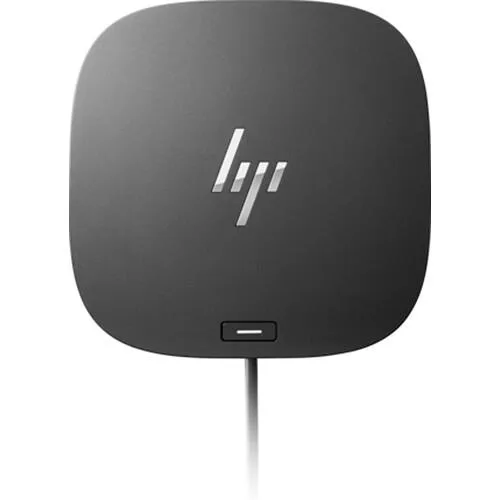
A compact docking station delivering 120 W power, video for multiple displays, Ethernet and extra ports through one USB-C cable
The HP USB-C G5 Essential Dock connects a laptop to peripherals, external monitors and a wired network through a single USB-C cable. A 120 W power adapter is included to charge the host system while the dock is in use. Its 4.80 x 4.80 x 1.77 in footprint keeps the desktop tidy.
Suits users who want one cable to carry video, data, Ethernet and charging to a compatible USB-C laptop. Not for buyers who need Thunderbolt bandwidth, legacy barrel-charging support or MAC address pass-through for network imaging.
The 120 W adapter determines whether the dock can charge a particular laptop while driving connected displays. Verify that the host device accepts 120 W over USB-C Power Delivery before purchasing.
| Brand | HP |
|---|---|
| Part Number | 784Q9AA#ABA |
| Color | Black |
| Dimension | 4.80 x 4.80 x 1.77 in |
| Weight | 1.5400 lb |
| Features | HP USB-C G5 Essential Dock |
The compact 4.80 x 4.80 x 1.77 in enclosure has no fan listed in the specifications, so it operates silently and relies on passive cooling during extended use.
Your notebook needs a USB-C port that supports DisplayPort Alt Mode and USB-C Alt Mode charging to enable video, data and 120 W power delivery through the single cable.
The dock connects via USB-C and supports Thunderbolt hosts; legacy USB 3.0 devices plug into the dock’s downstream ports and operate at their native speeds.
More in Docking Station
Same shelf, same checkout — eight coins and a 30-minute rate lock.
What you pay in, and what you read prices in.
Sent from your wallet at checkout
Display only — the catalogue is priced in USD
No currency matches that.
New here?
Already have one?
There is no automatic reset: this shop sends no mail, so there is no one-time link to ask for. Leave the address on the account and it gets picked up by hand.
Request noted
Nothing is on its way to your inbox — this shop sends no mail at all. Someone picks these up by hand.
Remembered it?