

Panorama Antennas
Panorama Antennas LG-IN2445 5G 71 Dome Wi-Fi adapter
- Accessories
$282.99
0.00340533BTC
In stockWe take cryptocurrency — so the coins you hold can buy real hardware.Pay in crypto, spend it on real hardware. Free insured shipping worldwide over $399. Plain, unbranded boxes, sent from Germany.Free insured shipping over $399. Your rate is locked for 30 minutes once checkout opens.Rate locked 30 minutes. Every item sealed, serial-checked and covered by a 24-month warranty.Sealed, 24-month warranty.


HP
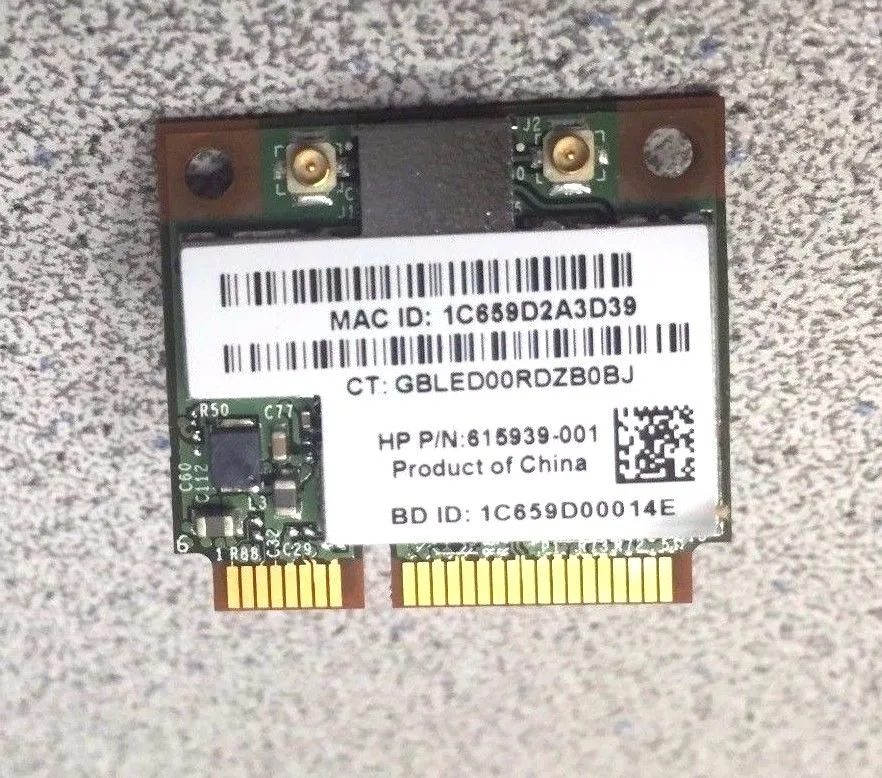
An M.2 card adds 802.11 b-g-n Wi-Fi and Bluetooth 2.1 connectivity to compatible laptops
This HP wireless adapter combines 802.11 b-g-n Wi-Fi with Bluetooth 2.1 + EDR in a single M.2 card. It is intended for notebook or small-form-factor upgrades where an integrated wireless module is required. The 615939-001 part number identifies the specific HP spare for service or replacement. Buyers who need 5 GHz band support or newer Bluetooth versions should choose a different module.
The adapter draws minimal power from the M.2 slot and adds negligible heat to the system. Passive operation means no fan noise is generated during normal wireless or Bluetooth activity. Thermal impact on surrounding components is insignificant in typical laptop or compact desktop chassis.
| Type | M.2 Wi-FI Adapter |
|---|
Insert the card into the M.2 slot at an angle, press down, and secure with the screw; the step often missed is attaching the two antenna cables to the connectors marked Main and Aux.
No routine maintenance is required; if the card fails or a newer Wi-Fi standard is needed, replace the whole M.2 module.
Also in this aisle
Same shelf, same checkout — eight coins and a 30-minute rate lock.
What you pay in, and what you read prices in.
Sent from your wallet at checkout
Display only — the catalogue is priced in USD
No currency matches that.
New here?
Already have one?
There is no automatic reset: this shop sends no mail, so there is no one-time link to ask for. Leave the address on the account and it gets picked up by hand.
Request noted
Nothing is on its way to your inbox — this shop sends no mail at all. Someone picks these up by hand.
Remembered it?



