


Hitoor
Hitoor 8K Triple Monitor DP KVM Switch 2 PC 3 Mon 4K144Hz 8K60Hz DP1.4 4 USB 3.0
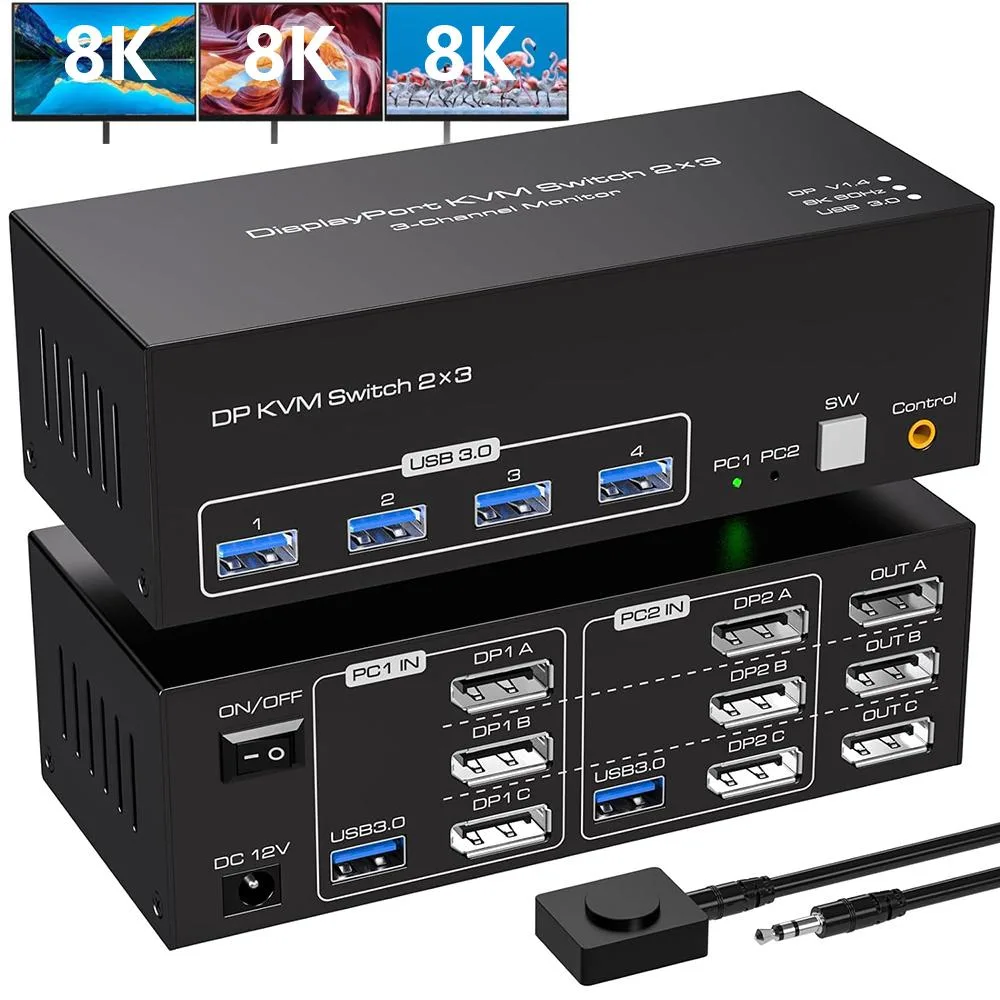
A DisplayPort KVM switch lets two computers share three monitors at up to 8K 60 Hz or 4K 144 Hz, plus four USB 3.0 peripherals, switched by front buttons or a wired remote
- TypeDisplayPort, USB
- Computer Connections2 Ports
- Monitor Connections3 Ports
- Video Resolution7680 x 4320
- PC SelectionPush Buttons
- Monitors SupportedTriple Monitor
- Share two computers across three monitors up to 8K 60 Hz
- Enjoy smooth 4K 144 Hz gaming on triple displays via DP 1.4
- Switch instantly with front buttons or desktop controller and LED status
- Connect keyboard, mouse, printer and webcam through four USB 3.0 ports at 5 Gbps
- Compact 15 × 6.5 × 4.8 cm unit includes power adapter and cables
Triple-monitor DP 1.4 KVM for two PCs
This DisplayPort 1.4 KVM switch lets two computers share three monitors and a set of USB peripherals. Each computer must provide three DP outputs to drive the triple-head layout. The unit handles duplicated or expanded desktops up to 4K at 144 Hz and 8K at 60 Hz. It is aimed at professionals and enthusiasts who run multi-display workstations across two hosts.
Three DP inputs per system and four USB 3.0 ports
The switch presents three DP inputs for each computer and three DP outputs for the monitors, plus four USB 3.0 hub ports for keyboard, mouse, printer or other devices. Video bandwidth reaches 48 Gbps and USB data runs at 5 Gbps, backward compatible with USB 2.0 and 1.1. Switching is done by front-panel push buttons or the included wired remote, with LED indicators showing the active host. A 12 V power adapter is supplied.
Replaces dual-monitor KVMs and manual cable swapping
Moving from a two-display KVM to this three-display model adds a third screen without adding a second switch. The upgrade is worth it when both computers have three DP outputs and the workflow benefits from the extra desktop space. It does not suit builds where either host lacks a third DP port or where single-monitor sharing is all that is required.
Highlights
- Share two computers across three monitors up to 8K 60 Hz
- Enjoy smooth 4K 144 Hz gaming on triple displays via DP 1.4
- Switch instantly with front buttons or desktop controller and LED status
- Connect keyboard, mouse, printer and webcam through four USB 3.0 ports at 5 Gbps
- Compact 15 × 6.5 × 4.8 cm unit includes power adapter and cables
Specifications
| Type | DisplayPort, USB |
|---|---|
| Computer Connections | 2 Ports |
| Monitor Connections | 3 Ports |
| Video Resolution | 7680 x 4320 |
| PC Selection | Push Buttons |
| Monitors Supported | Triple Monitor |
| LED Indicators | Yes |
| Power Features | Requires no additional power supply |
| USB Features | with USB support |
| Application | This KVM switch has 3 DP ports for connecting 2 computers with 3 monitors (requires your computer's mainframe's graphics card to have 3 DP outputs) NOTE (Please make sure that each of your computers can support triple displays before purchasing) |
| Features | 1. Connects 2 computer hosts to share 1 set of keyboard, mouse and 2 monitors (3 DP Ports) 2. Triple-monitor output supports duplicated and expanded displays up to 4K@144Hz and is DP 1.4 compliant 3. Supports barcode scanners, USB hard drives, or other USB devices connected to the KVM via 4 USB 3.0 hub ports 4. Supports front panel pushbuttons and external switch buttons to control the KVM to switch input sources |
| Dimensions | 15 x 6.5 x 4.8 cm |
| Weight | 640 Grams |
| Package Contents | 1 x Triple Monitor KVM Switch, 2 x USB 3.0 Cable, 1 x Desktop Controller, 1 x Power Adapter, 1 x User Manual |
Questions about this item
Will the 48 Gbps video bandwidth limit how many of the three monitors can run at 4K 144 Hz simultaneously?
The switch supports triple-monitor output up to 4K at 144 Hz and is DP 1.4 compliant, so the 48 Gbps bandwidth accommodates all three displays at that resolution and refresh rate.
Does the unit need its own 12 V power adapter for all-day operation or can it run from the USB 3.0 ports alone?
A 12 V DC adapter is included in the package and the specifications list a power adapter, so the KVM requires external power for continuous use.
My two PCs each have only two DisplayPort outputs — what must I already own to drive three monitors through this KVM?
Each computer needs three DisplayPort 1.4 outputs on its graphics card to supply the three DP inputs the switch expects for triple-monitor operation.
Also in this aisle
People compared these
Same shelf, same checkout — eight coins and a 30-minute rate lock.


Black Box Corporation
Black Box Corporation 4K60 HDMI Dual-Head KVM Switch 4 Port
$774.99
0.00922706BTC
In stock