


ESTONE
ESTONE SW204N-DP KVM Switch 2-Port DP 8K@60Hz 4K@144Hz 4×USB 3.0
Share one monitor and four USB 3.0 devices between two computers with 8K@60Hz or 4K@144Hz DisplayPort switching via front buttons or desktop controller
- TypeDisplayPort, USB
- PC ConnectorsDisplayport, USB
- Computer Connections2 Port DisplayPort
- Monitor Connections2 Ports
- Video Resolution8K 60Hz
- PC SelectionPush Buttons/Desktop Controller
- Share one monitor and four USB devices between two computers via dual DisplayPort inputs
- Switch instantly with front-panel buttons or the wired desktop controller for zero-delay peripheral handoff
- Drive 8K at 60 Hz or 4K at 144 Hz for high-refresh gaming and detailed creative work
- Four USB 3.0 ports deliver 5 Gbps bandwidth for printers, scanners and fast storage
- Plug-and-play across Windows, macOS, Linux and Unix with no drivers required
ESTONE SW204N-DP 2-Port DisplayPort KVM
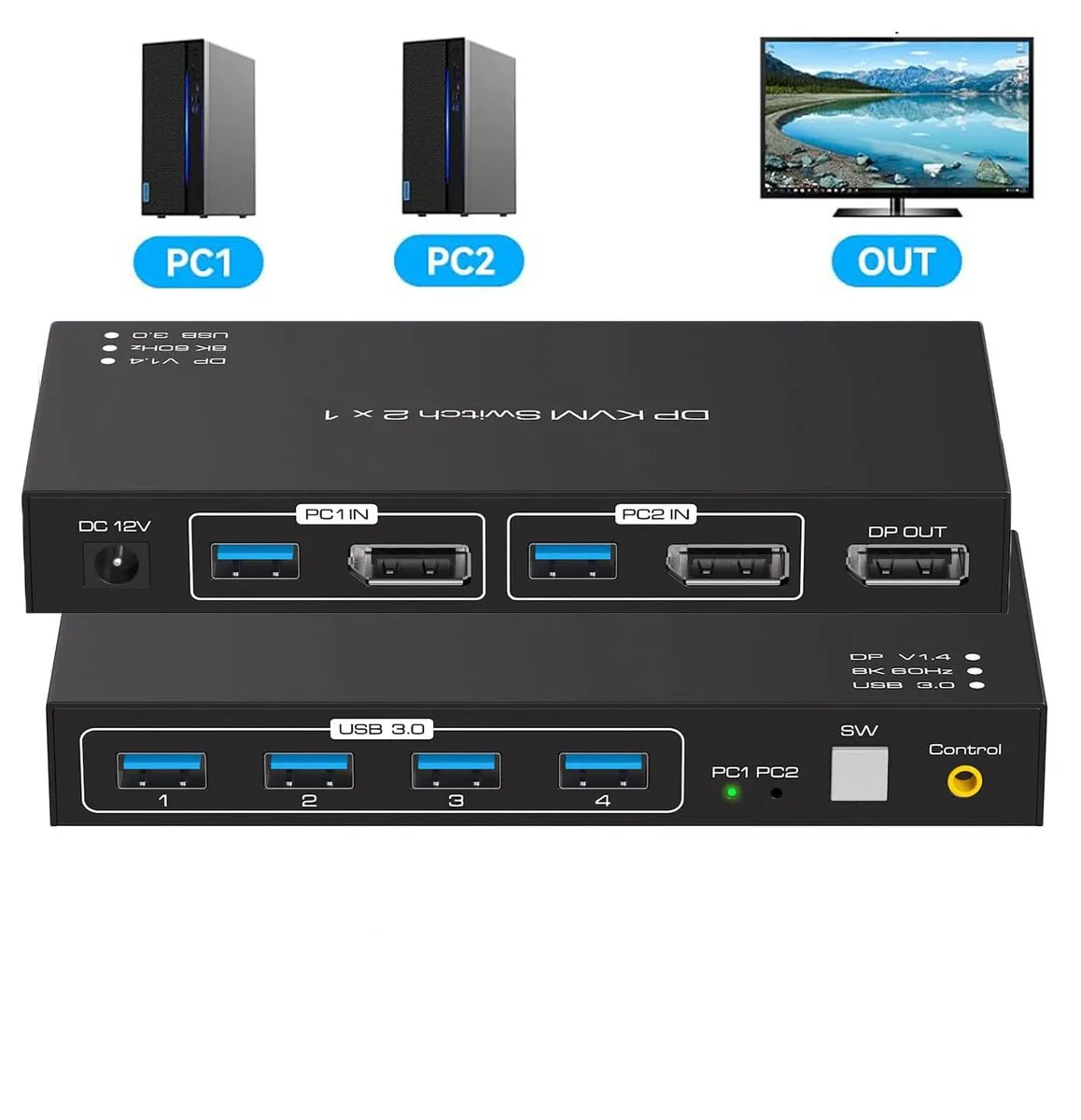
The ESTONE SW204N-DP lets two computers or laptops share one DisplayPort monitor and four USB 3.0 peripherals such as keyboard, mouse, printer or scanner. It supports video resolutions up to 7680×4320 at 60 Hz and is backward compatible with 4K at 144 Hz. A wired desktop controller and front-panel push buttons give instant switching with no perceptible delay. The unit ships with two USB 3.0 cables and a power adapter for plug-and-play operation on Windows, macOS, Linux or Unix.
Installation and common issues
Connect each computer to the switch using the supplied USB 3.0 cables and a DisplayPort 1.4 cable for full 8K 60 Hz bandwidth; lesser cables will limit the maximum resolution. Plug the monitor into the single output and attach up to four USB devices to the front ports. The external controller allows switching without reaching the main box, and LED indicators confirm the active port. A frequent issue is using older DisplayPort cables that cannot carry the 1.4 signal, resulting in a blank screen or reduced refresh rate.
Pre-purchase checklist
Verify that both source systems have DisplayPort outputs and that your monitor accepts the desired resolution and refresh rate over DisplayPort. Confirm you have a DisplayPort 1.4 certified cable for each computer if 8K 60 Hz or 4K 144 Hz is required. Ensure a free USB Type-A port on each computer for the supplied USB 3.0 cables. Check that the 5.43 × 5.35 × 1.46 inch chassis fits your desk space and that the included power adapter can reach a mains outlet.
Highlights
- Share one monitor and four USB devices between two computers via dual DisplayPort inputs
- Switch instantly with front-panel buttons or the wired desktop controller for zero-delay peripheral handoff
- Drive 8K at 60 Hz or 4K at 144 Hz for high-refresh gaming and detailed creative work
- Four USB 3.0 ports deliver 5 Gbps bandwidth for printers, scanners and fast storage
- Plug-and-play across Windows, macOS, Linux and Unix with no drivers required
Specifications
| Brand | ESTONE |
|---|---|
| Series | SW204N-DP |
| Model | SW204N-DP |
| Type | DisplayPort, USB |
| PC Connectors | Displayport, USB |
| Computer Connections | 2 Port DisplayPort |
| Monitor Connections | 2 Ports |
| Video Resolution | 8K 60Hz |
| PC Selection | Push Buttons/Desktop Controller |
| AutoScan Interval | 3 seconds |
| LED Indicators | Yes |
| USB Features | with USB support |
| Application | 2 in 1 out DisplayPort KVM Switch: DP KVM Switch is a displayport switch that help 2 computers/laptops to share 1 monitor and 4 USB 3.0 devices such as scanner, printer, mouse, keyboard. |
| Features | 2 in 1 out DisplayPort KVM Switch: DP KVM Switch is a displayport switch that help 2 computers/laptops to share 1 monitor and 4 USB 3.0 devices such as scanner, printer, mouse, keyboard. Using only 1 set of keyboard, mouse and monitor to control 2 computers devices. Available to use keyboard and mouse without any delay after switch input sources. With 4xUSB 3.0 ports, the KVM Switch is possible to connect Printer, scanner, USB hard drive or other USB devices. Support 8K@60Hz 4K@120Hz, resolution up to 7680*4320@ 60Hz. Support front panel buttons and External switch button to control |
| Dimensions | 5.43 x 5.35 x 1.46 inches |
| Weight | 9.52 Ounces |
| Package Contents | 1x Displayport KVM Switch, 1 x External Controller Kits, 2 x USB 3.0 Cable, 1 x Power Adapter, 1 x User Manual. |
Questions about this item
How do I confirm the ESTONE SW204N-DP is switching correctly after connecting two PCs and a monitor?
Press the front panel button or the wired desktop controller; the LED indicators will show the active port and the monitor should display the selected computer's output immediately with no keyboard or mouse delay.
What cables and accessories come with the ESTONE SW204N-DP and what must I provide?
The box includes the KVM unit, a wired desktop controller, two USB 3.0 cables, a power adapter and a user manual; you must supply the DisplayPort cables for each computer and the monitor connection.
Which DisplayPort cable standard should I use to reach 8K at 60 Hz on the ESTONE SW204N-DP?
Use a DP 1.4 cable for 8K at 60 Hz; the switch is backward compatible with DP 1.2 and DP 1.1 for lower resolutions such as 4K at 144 Hz.
Also in this aisle
People compared these
Same shelf, same checkout — eight coins and a 30-minute rate lock.


Black Box Corporation
Black Box Corporation 4K60 HDMI Dual-Head KVM Switch 4 Port
$774.99
0.00932184BTC
In stock