


ESTONE
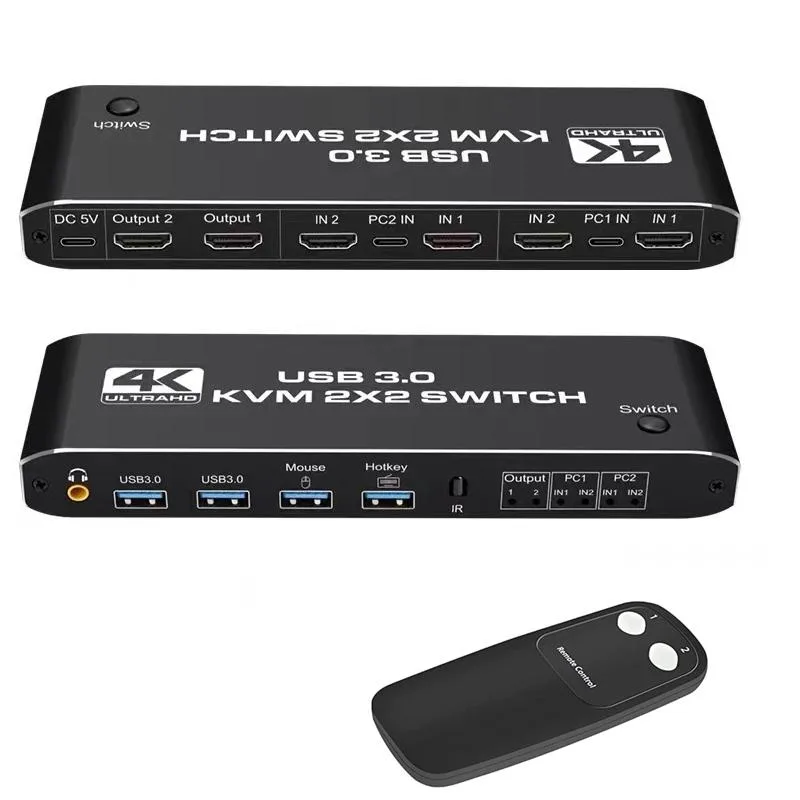
ESTONE 2-in-2-out 4K@60Hz HDMI 2.0 KVM Switch with USB 3.0 Hub and 3.5mm Audio
Controls two computers across dual monitors at 4K 60 Hz with USB 3.0 peripheral sharing and 3.5 mm audio switching
- Type2 in 2 Out HDMI KVM Switch
- Controls two computers with dual monitors at 4K@60Hz
- Shares keyboard, mouse and USB 3.0 peripherals between both PCs
- 5 mm audio jack switches sound with the active system
- Hotkey and front button give instant PC switching
- Aluminium alloy shell resists interference and aids heat dissipation
Dual-monitor KVM for two PCs
This ESTONE KVM switch lets two computers share two HDMI monitors, a USB keyboard and mouse, plus two USB 3.0 peripherals and a 3.5 mm audio device. It supports 4K resolution at 60 Hz with RGB 4:4:4 colour, HDR and HDCP. The aluminium-alloy housing measures 111.8 mm by 63.2 mm by 24.5 mm.
Verify dual-video outputs and USB-C video
Each computer must be able to drive two displays simultaneously; a single HDMI port requires an active converter such as DP-to-HDMI or USB-C-to-HDMI. The switch provides four HDMI 2.0 inputs (two per PC), two USB-C inputs and four USB 3.0 inputs, so confirm your ports match before ordering. Hotkey and front-panel button switching are both available.
Sustained 4K 60 Hz with 5 Gbps USB
Under continuous use the unit maintains 4K at 60 Hz without frame drops, while the USB 3.0 hub sustains up to 5 Gbps throughput for attached storage or cameras. The metal shell provides anti-interference shielding and passive cooling, keeping signal integrity stable during long work or streaming sessions.
Highlights
- Controls two computers with dual monitors at 4K@60Hz
- Shares keyboard, mouse and USB 3.0 peripherals between both PCs
- 5 mm audio jack switches sound with the active system
- Hotkey and front button give instant PC switching
- Aluminium alloy shell resists interference and aids heat dissipation
Specifications
| Type | 2 in 2 Out HDMI KVM Switch |
|---|
Questions about this item
What cables come with the switch and what must I buy separately?
The box includes the KVM unit only; you need to supply four HDMI 2.0 cables for the computer inputs, two HDMI 2.0 cables for the monitor outputs, two USB-C or USB 3.0 cables for the upstream links, and any 3.5 mm audio cable you want to use.
Should I use the USB-C or the USB 3.0 upstream ports for my computers?
Each computer connects through one USB-C and one USB 3.0 port; use whichever port type matches the computer — both provide the same 5 Gbit/s hub speed for the shared keyboard, mouse and two USB 3.0 peripherals.
What does the 4K@60 Hz rating mean when I connect two monitors and two computers?
Each HDMI 2.0 output can drive a display at 4K 60 Hz with RGB 4:4:4, HDR and HDCP, so long as the source computer and the monitor both support that mode.
Also in this aisle
People compared these
Same shelf, same checkout — eight coins and a 30-minute rate lock.


Black Box Corporation
Black Box Corporation 4K60 HDMI Dual-Head KVM Switch 4 Port
$774.99
0.009291BTC
In stock