

DELL
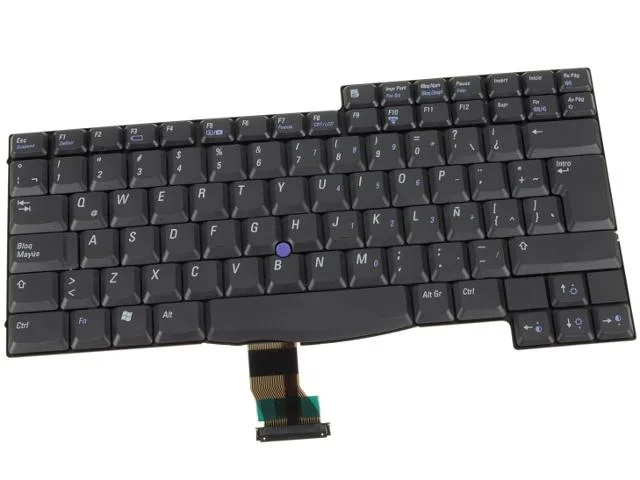
DELL Spanish Keyboard Latitude C540 C640 Inspiron 4150 8P648
Spanish keyboard replacement for Dell Latitude C540, C640 and Inspiron 4150 laptops
- Spanish layout for Dell Latitude C540 and C640
- Direct fit for Inspiron 4150 laptops
- Genuine Dell OEM part number 8P648
- New condition, fully tested for reliability
- Ready-to-install replacement keyboard module
Spanish Keyboard for Latitude and Inspiron
This replacement keyboard fits Dell Latitude C540 and C640 models as well as the Inspiron 4150. It carries the Dell OEM part number 8P648 and features a Spanish layout for regional typing requirements.
Direct OEM replacement for worn or damaged units
The part replaces the original keyboard when keys fail, membranes degrade or liquid damage occurs. Swapping the board restores full input function without needing a new laptop chassis.
Covers standard typing workloads for supported
The keyboard handles everyday office, education and legacy software tasks on the listed Latitude and Inspiron systems. It does not support backlighting, programmable macros or layouts other than Spanish.
Highlights
- Spanish layout for Dell Latitude C540 and C640
- Direct fit for Inspiron 4150 laptops
- Genuine Dell OEM part number 8P648
- New condition, fully tested for reliability
- Ready-to-install replacement keyboard module
Specifications
| Brand | Dell |
|---|
Questions about this item
Does the 8P648 keyboard fit the Latitude C540 and C640 models?
Yes, the part number 8P648 is listed as compatible with Dell Latitude C540, C640 and Inspiron 4150 laptops.
How do I install this Spanish keyboard and what step is often missed?
Remove the old keyboard, connect the ribbon cable firmly into the motherboard connector, then secure the replacement with the original screws; the step often missed is not seating the cable fully before locking the latch.
Will the Spanish key layout require a different driver or OS setting later?
The hardware is a direct replacement; after installation, add the Spanish input language in Windows so the key labels match the on-screen characters.
Also in this aisle
People compared these
Same shelf, same checkout — eight coins and a 30-minute rate lock.


Case Logic
Case Logic 3203990 briefcase for 15.6 in laptop with 10.1 in tablet pocket
$30.99
0.00037104BTC
In stock