
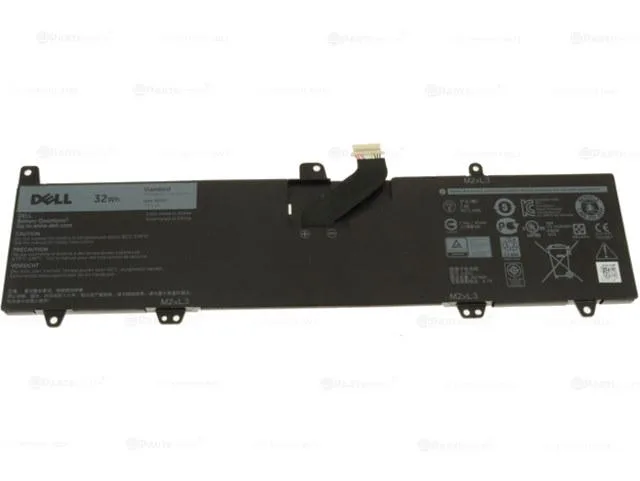


DELL
DELL PGYK5 32Wh 7.6V 2-cell laptop battery 0JV6J
Genuine Dell 32Wh 7.6V 2-cell Li-ion battery compatible with Inspiron 11 3162, 3164, 3168, 3169, 3179, 3180 and 3185 2-in-1 models
- ColorBlack
- Type0JV6J
- Battery Voltage7.6V
- Battery Capacity32Wh
- Genuine Dell OEM part fits Inspiron 11 models 3162 3164 3168 3169 3179 3180 3185
- 32Wh capacity delivers reliable runtime for everyday tasks
- 6V 2-cell lithium-ion chemistry provides stable power output
- Replacement part numbers 8NWF3 PGYK5 0JV6J ensure exact compatibility
- Brand-new condition guarantees full performance from first charge
Direct replacement for Inspiron 11 series
This 32Wh 7.6V lithium-ion battery is built for Dell Inspiron 11 models 3162, 3164, 3168, 3169, 3179, 3180 and the 3185 2-in-1. It matches the original 0JV6J part number and PGYK5 type for a drop-in fit. Owners of other Dell lines or larger Inspiron chassis will need a different battery.
Low heat and silent operation
The two-cell pack runs cool during typical workloads and produces no audible noise because it has no moving parts. Power draw follows the laptop's own management firmware, so the system regulates charge rates without extra configuration. There is no fan or pump to consider.
Ready to install with no extra software
The package contains only the battery itself; no drivers, utilities or calibration tools are bundled. The laptop's BIOS recognises the pack immediately and handles charging algorithms automatically. No cables, screws or mounting brackets are included.
Highlights
- Genuine Dell OEM part fits Inspiron 11 models 3162 3164 3168 3169 3179 3180 3185
- 32Wh capacity delivers reliable runtime for everyday tasks
- 6V 2-cell lithium-ion chemistry provides stable power output
- Replacement part numbers 8NWF3 PGYK5 0JV6J ensure exact compatibility
- Brand-new condition guarantees full performance from first charge
Specifications
| Brand | DELL |
|---|---|
| Model | PGYK5 |
| Color | Black |
| Type | 0JV6J |
| Battery Voltage | 7.6V |
| Battery Capacity | 32Wh |
Questions about this item
How do I install the PGYK5 battery in an Inspiron 11 3168 and what step is often missed?
Power off the laptop, remove the bottom case screws, disconnect the old pack, connect the new 7.6V 2-cell unit, then reassemble; the step often missed is reconnecting the battery cable before closing the case
What maintenance or replacement will the 32Wh pack need later?
The lithium-ion cells degrade with each charge cycle; plan to replace the battery when run-time no longer meets your needs
What limit appears first during sustained use of the 7.6V 2-cell battery?
The 32Wh capacity sets the maximum run-time; under continuous load the pack will reach its energy limit before thermal throttling becomes a factor
Also in this aisle
People compared these
Same shelf, same checkout — eight coins and a 30-minute rate lock.


Case Logic
Case Logic 3203990 briefcase for 15.6 in laptop with 10.1 in tablet pocket
$30.99
0.00037121BTC
In stock