


DELL
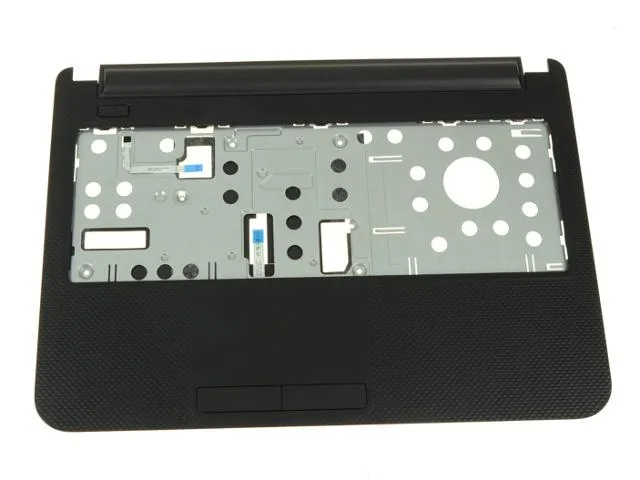
DELL Palmrest Touchpad Assembly 0W8M0 for Inspiron 14 3421 3437 5437 Black
Genuine Dell palmrest with touchpad, buttons, power board and cables for Inspiron 14 3421, 3437 and 5437 models
- Accessory TypePalmrest Touchpad
- ColorBlack
- Genuine Dell replacement fits Inspiron 14 3421 3437 5437 models
- Black textured palmrest restores original look and feel
- Integrated touchpad and mouse buttons with ribbon cables included
- Power button board with ribbon cable supplied ready to install
- New OEM part number 0W8M0 ensures exact compatibility
Genuine Dell Palmrest Touchpad 0W8M0
This genuine Dell palmrest touchpad assembly carries part number 0W8M0 and is finished in black with a textured surface. It is built for Inspiron 14 models 3421, 3437 and 5437, providing a direct fit for worn or damaged original equipment. The unit ships new and includes the touchpad, mouse buttons, ribbon cables and the power button board with its ribbon.
Passive component with no thermal load
The assembly contains no active electronics that generate heat, draw power or produce noise during normal laptop operation. It functions as a structural and input surface only, so thermals, acoustics and power consumption are unaffected by the replacement. Installation simply restores the original tactile feel and button response.
Replaces cracked or unresponsive palmrests
This part replaces a palmrest that has cracked, lost button click integrity or developed a faulty touchpad sensor. The upgrade is worth it when the existing assembly shows physical damage or intermittent cursor control that cleaning cannot fix. It is not for buyers who need a different layout, a backlit keyboard integration or a trackpoint module.
Highlights
- Genuine Dell replacement fits Inspiron 14 3421 3437 5437 models
- Black textured palmrest restores original look and feel
- Integrated touchpad and mouse buttons with ribbon cables included
- Power button board with ribbon cable supplied ready to install
- New OEM part number 0W8M0 ensures exact compatibility
Specifications
| Brand | DELL |
|---|---|
| Part Number | 0W8M0 |
| Accessory Type | Palmrest Touchpad |
| Color | Black |
Questions about this item
How do I install the 0W8M0 palmrest touchpad assembly on an Inspiron 14 3437, and which cable is most often missed?
Remove the battery and base cover, disconnect the old palmrest ribbon cables, then connect the new touchpad ribbon and the power-button board ribbon before securing the assembly; the power-button board ribbon is the one most often missed.
What maintenance or replacement will the 0W8M0 palmrest touchpad assembly need later?
The textured black surface can wear smooth over time; if the touchpad or mouse buttons become erratic, the whole 0W8M0 assembly must be replaced as the cables are integrated.
What limit appears first on the 0W8M0 palmrest touchpad assembly under sustained use?
The integrated ribbon cables fatigue from repeated flexing when the lid opens and closes, eventually causing intermittent touchpad or power-button response.
Also in this aisle
People compared these
Same shelf, same checkout — eight coins and a 30-minute rate lock.


Case Logic
Case Logic 3203990 briefcase for 15.6 in laptop with 10.1 in tablet pocket
$30.99
0.00037276BTC
In stock