
DELL
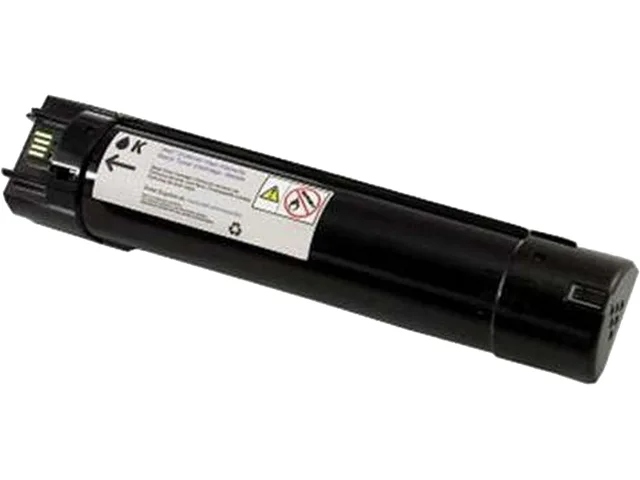
DELL N848N Black High Yield Toner Cartridge 18000 Pages toner cartridges (genuine brands)
Black high-yield toner cartridge prints up to 18000 pages for the Dell 5130cdn
- Cartridge Quantity1 Pack
- Cartridge ColorBlack
- Compatible ProductsDell 5130cdn
- Approximate Page Yield18000 Pages
- FeaturesDELL 5130CDN (P942P) HI YLD BLACK TONER OEM Part: N848N
- High-yield black toner prints up to 18000 pages
- Genuine Dell OEM cartridge ensures reliable performance
- Designed for Dell 5130cdn printer compatibility
- Single-pack format simplifies replacement workflow
- New condition guarantees consistent print quality
Genuine Dell high-yield black toner
This is a brand-new Dell N848N black toner cartridge rated for approximately 18000 pages. It is an original Dell OEM cartridge supplied in a single pack. The cartridge is designed for use with the Dell 5130cdn colour laser printer.
Compatibility limited to Dell 5130cdn
Suitable for owners of a Dell 5130cdn printer who need a genuine replacement black toner with high page yield. Not suitable for users of any other printer model, those requiring colour toner cartridges, or buyers seeking third-party compatible or remanufactured alternatives.
18000-page yield at standard coverage
The decisive specification is the approximate yield of 18000 pages, which determines how long the cartridge will last before replacement. This figure is based on standard industry coverage and confirms the high-yield capacity for the Dell 5130cdn.
Highlights
- High-yield black toner prints up to 18000 pages
- Genuine Dell OEM cartridge ensures reliable performance
- Designed for Dell 5130cdn printer compatibility
- Single-pack format simplifies replacement workflow
- New condition guarantees consistent print quality
Specifications
| Brand | Dell |
|---|---|
| Model | N848N |
| Cartridge Quantity | 1 Pack |
| Cartridge Color | Black |
| Compatible Products | Dell 5130cdn |
| Approximate Page Yield | 18000 Pages |
| Features | DELL 5130CDN (P942P) HI YLD BLACK TONER OEM Part: N848N |
| Shipping weight | 1.81 kg |
| Package size | 305 × 152 × 152 mm |
Questions about this item
How do I install the Dell N848N toner cartridge in the Dell 5130cdn, and what step is often missed?
Open the front cover, pull the old cartridge straight out, remove the new N848N from its packaging, gently rock it side-to-side to distribute toner, peel off the sealing tape completely, then slide it in until it clicks. The step most often missed is removing the full length of sealing tape before insertion.
What maintenance or replacement will the Dell N848N cartridge need after the 18000 page yield is reached?
Once the 18000 page yield is reached, the N848N cartridge itself must be replaced with a new genuine Dell cartridge. The Dell 5130cdn may also prompt for separate maintenance items such as the imaging drum or waste toner container based on their own lifecycle counters.
What limit appears first during sustained high-volume printing with the N848N in the Dell 5130cdn?
The 18000 page yield rating is the first limit reached under sustained use; after this volume the toner is depleted and the cartridge must be replaced to continue printing.
Also in this aisle
People compared these
Same shelf, same checkout — eight coins and a 30-minute rate lock.


Tripp Lite
Tripp Lite U324-003-BK USB 3.0 cable USB-A to USB-A 3 ft
- USB
- Black
$13.99
0.00016808BTC
In stock

MADE IN USA TONER
MADE IN USA TONER TK-8367K Cyan Toner Cartridge 25000 Pages
$48.99
0.00058857BTC
In stock