


DBTLAP
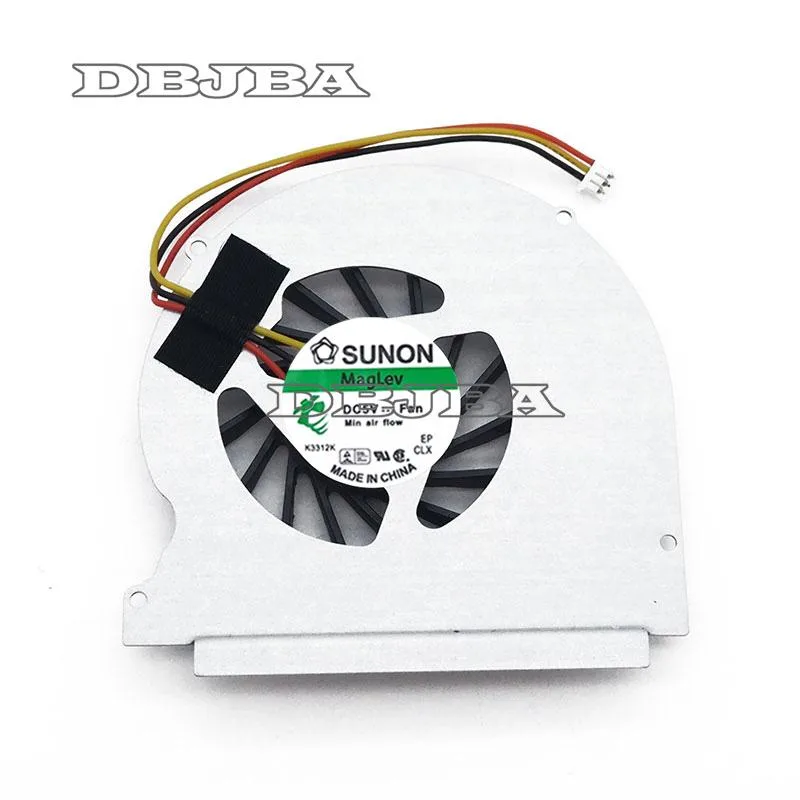
DBTLAP Laptop Fan for Toshiba Satellite P745-S4102 CPU Fan
Replacement CPU cooler for Toshiba Satellite P745-S4102 laptops, tested before shipping
- Accessory TypeCooler
- Direct replacement for Toshiba Satellite P745-S4102
- 100% tested before shipping for reliable operation
- Nine-month warranty included for peace of mind
- Compatible with multiple OEM fan manufacturers
- Single fan unit ready for installation
Replacement CPU Fan for Toshiba Satellite P745-S4102
This new laptop cooling fan is a direct replacement for the CPU cooler inside the Toshiba Satellite P745-S4102 notebook. It arrives as a single tested unit ready for installation. The part is designed to restore original thermal performance when the existing fan fails or becomes noisy.
Suitable for owners repairing a specific Toshiba
This cooler suits technicians or owners servicing a Toshiba Satellite P745-S4102 who need a verified working fan. It is not for users with different Satellite series laptops or other brands. Buyers wanting a complete heatsink assembly or external cooling pad should look elsewhere.
Verify the original fan before ordering
Compare the product photos closely with the fan currently inside your machine to confirm connector layout and mounting points match. The manufacturer notes that suppliers vary between Forcecon, ADDA, Sunon, Kipo or others, so physical details may differ. Contact the seller if you are uncertain about fitment.
Highlights
- Direct replacement for Toshiba Satellite P745-S4102
- 100% tested before shipping for reliable operation
- Nine-month warranty included for peace of mind
- Compatible with multiple OEM fan manufacturers
- Single fan unit ready for installation
Specifications
| Accessory Type | Cooler |
|---|
Questions about this item
Does my Toshiba Satellite P745-S4102 need any extra brackets or cables to fit this DBTLAP fan?
The package includes only the fan itself, so reuse the mounting screws and power connector already on your original cooler.
Will this replacement cooler run properly on the original motherboard header used by my old P745-S4102 fan?
Yes, it connects to the same 3-pin or 4-pin CPU fan header and draws power from the board exactly as the factory unit did.
How can I confirm the new fan is spinning at the correct speed after installation?
Enter the BIOS hardware monitor or use a Windows utility such as HWMonitor to verify the RPM reading matches the speed curve shown for the CPU temperature.
Also in this aisle
People compared these
Same shelf, same checkout — eight coins and a 30-minute rate lock.


Case Logic
Case Logic 3203990 briefcase for 15.6 in laptop with 10.1 in tablet pocket
$30.99
0.00037329BTC
In stock