

DBTLAP
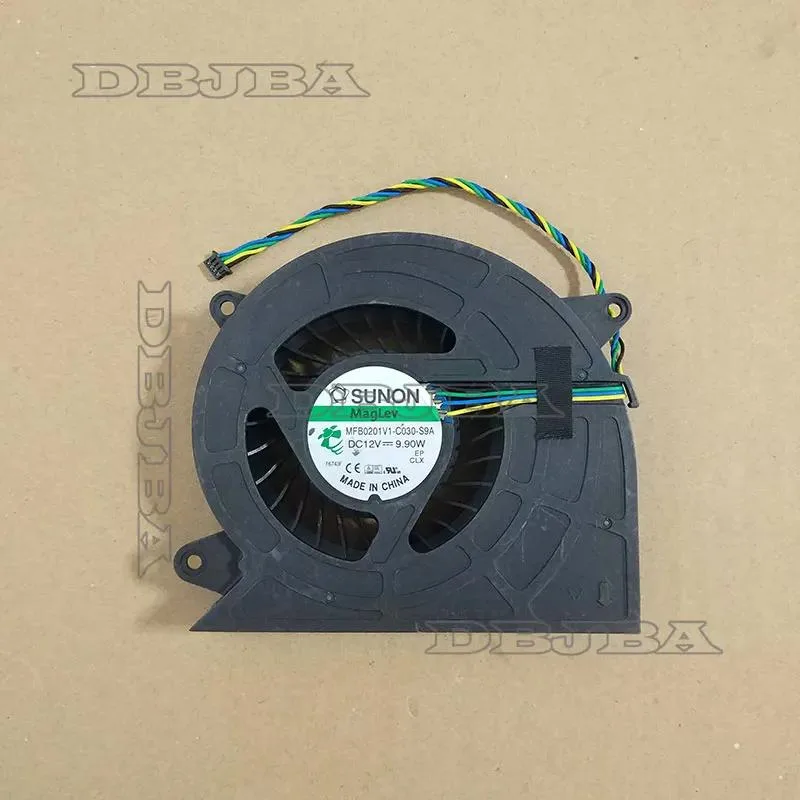
DBTLAP CPU cooler fan for Lenovo AIO 00KT209 MFB0201V1-C030-S9A
Replacement CPU cooling fan compatible with select Lenovo all-in-one models including A7300 and V530-22IC
- Accessory TypeCooler
- Direct replacement for Lenovo AIO 00KT209
- Pre-tested fan ensures reliable cooling performance
- Matches original MFB0201V1-C030-S9A part exactly
- Compatible with multiple Lenovo AIO series models
- Real product photos confirm correct fitment
Replacement cooler for Lenovo AIOs
This DBTLAP CPU cooler is a direct replacement part for select Lenovo all-in-one desktops. It arrives new and individually tested before dispatch. The package contains one fan unit only. Buyers must verify the part number against their existing cooler to confirm fit.
Suits owners of listed Lenovo models needing
It fits the A7300, 400V310z, A5000, V530-22IC, Y910 and other units using part 00KT209 or MFB0201V1-C030-S9A. It is not for laptop cooling pads, tower desktops or any system outside the named Lenovo AIO range. Installers uncomfortable with internal disassembly should seek professional help.
Single-fan assembly restores factory cooling
The cooler matches the original specification for the supported all-in-one chassis. It handles the thermal load those systems were designed for. It offers no extra headroom for overclocked CPUs, upgraded GPUs or chassis modifications that increase heat output beyond stock limits.
Highlights
- Direct replacement for Lenovo AIO 00KT209
- Pre-tested fan ensures reliable cooling performance
- Matches original MFB0201V1-C030-S9A part exactly
- Compatible with multiple Lenovo AIO series models
- Real product photos confirm correct fitment
Specifications
| Accessory Type | Cooler |
|---|
Questions about this item
Which Lenovo AIO models must I already own for the 00KT209 fan to fit?
The fan is built for Lenovo AIO A7300 400V310z A5000 V530-22IC Y910 systems carrying part number 00KT209 MFB0201V1-C030-S9A.
Will the cooler obstruct any rear ports or stand brackets on those AIO chassis?
The unit is a direct replacement fan; it mounts in the original housing without blocking rear I/O or the integrated stand.
How can I confirm the 00KT209 fan is spinning correctly after installation?
Power on the AIO, listen for steady airflow from the exhaust vents and verify CPU temperatures stay within normal idle range.
Also in this aisle
People compared these
Same shelf, same checkout — eight coins and a 30-minute rate lock.


Case Logic
Case Logic 3203990 briefcase for 15.6 in laptop with 10.1 in tablet pocket
$30.99
0.00037152BTC
In stock