


DBTLAP
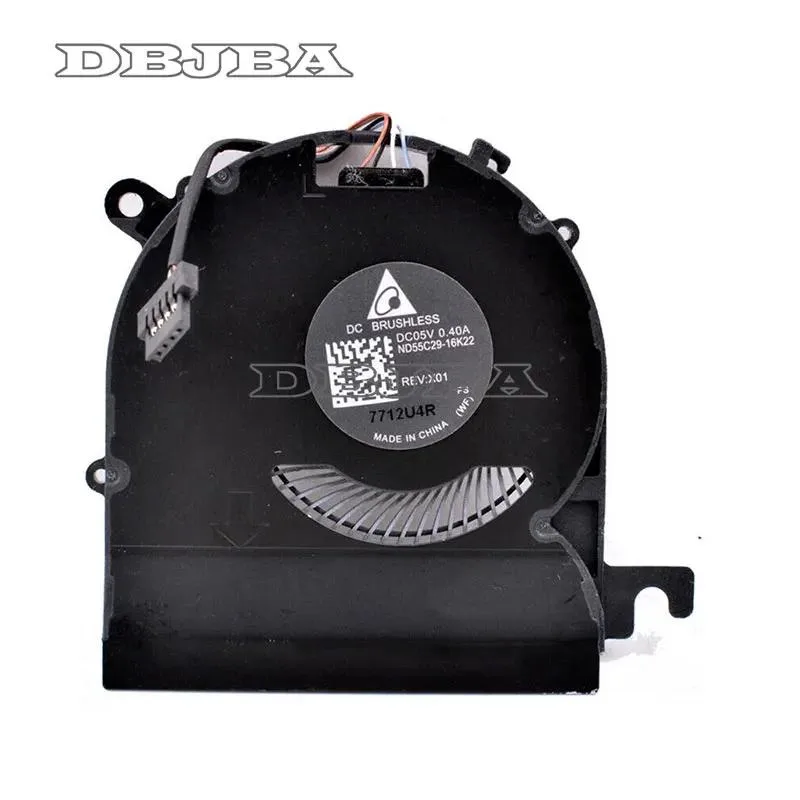
DBTLAP Cooling Fan for HP EliteBook X360 1020 G2 ND55C29-16K22
Replacement cooling fan for HP EliteBook X360 1020 G2 laptops, tested before shipping to ensure 100% compatibility
- Accessory TypeCooler
- Direct replacement for HP EliteBook X360 1020 G2
- DC5V 0.40A power specification matches original part
- Tested before shipping to ensure reliable operation
- Verify photos and part number for exact fit
- Single fan unit ready for installation
Replacement Fan for HP EliteBook X360 1020 G2
This new DBTLAP cooling fan is a direct replacement part for the HP EliteBook X360 1020 G2. It matches the original ND55C29-16K22 part number and operates at DC5V 0.40A. The package includes one tested fan unit ready for installation.
Suitable for owners with a matching part number
This suits technicians or owners repairing a specific HP EliteBook X360 1020 G2 where the original fan has failed. It is not for buyers who cannot confirm their part number against the photos or model ND55C29-16K22, nor for other laptop models or cooling pad accessories.
Critical specification is the ND55C29-16K22 part
Compatibility depends entirely on matching this exact part number to the component being replaced. Visual inspection of the supplied photos against the old fan is required before ordering to ensure correct fitment.
Highlights
- Direct replacement for HP EliteBook X360 1020 G2
- DC5V 0.40A power specification matches original part
- Tested before shipping to ensure reliable operation
- Verify photos and part number for exact fit
- Single fan unit ready for installation
Specifications
| Accessory Type | Cooler |
|---|
Questions about this item
How do I install the ND55C29-16K22 fan in my HP EliteBook X360 1020 G2, and which step is commonly missed?
Remove the bottom case, disconnect the old fan cable from the motherboard, swap the fan, then reconnect the cable; the step often missed is re-seating the connector fully so the 5V 0.40A power line makes contact.
What maintenance or replacement will this DC5V 0.40A cooling fan need later?
Clean dust from the blades and heatsink fins every few months with compressed air; if bearing noise appears or airflow drops, replace the fan unit as bearings are not serviceable.
What limit appears first when this fan runs continuously under heavy load?
The 5V 0.40A power budget caps maximum speed, so sustained loads hit the current limit before thermal throttling, capping RPM and airflow at the rated specification.
Also in this aisle
People compared these
Same shelf, same checkout — eight coins and a 30-minute rate lock.


Case Logic
Case Logic 3203990 briefcase for 15.6 in laptop with 10.1 in tablet pocket
$30.99
0.00037121BTC
In stock