

DBTLAP
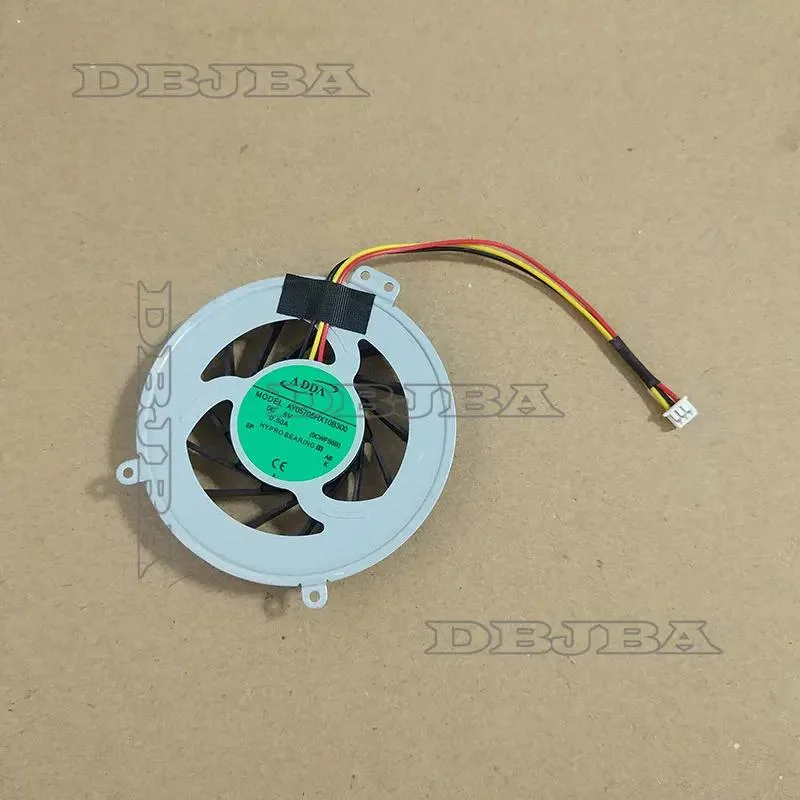
DBTLAP Cooling Fan for Fujitsu Lifebook AH552 AY05705HX10B300 0CWFS6B
Replacement cooling fan for Fujitsu Lifebook AH552, tested before shipping
- Accessory TypeCooler
- Keeps your Fujitsu Lifebook AH552 running cool with a direct-replacement fan
- Powers efficiently at DC5V and .50A for stable airflow
- Tested before shipping so it works straight out of the box
- Match the part number AY05705HX10B300 or 0CWFS6B for guaranteed fit
- Includes one fan ready to install in your laptop
Replacement Fan for Fujitsu Lifebook AH552
This replacement cooling fan is built for the Fujitsu Lifebook AH552 laptop. It suits owners who need to swap a worn or noisy original unit. The part matches the OEM reference AY05705HX10B300 and 0CWFS6B. Buyers who need a different connector or mounting layout should verify their model first.
DC 5 V 0.50 A Power Draw and Tested Operation
The fan runs on a DC 5 V supply drawing 0.50 A. Each unit is tested before shipping to confirm it spins correctly. Normal use should keep thermals steady and noise low. Builders who want higher airflow or a different voltage spec will need another solution.
Single Fan Unit with Direct Fit Mounting
The package contains one fan only, with no extra brackets or cables included. Photos show the exact item so you can confirm the connector and screw positions match your old part. Installers who need additional hardware or a full cooling assembly must source those separately.
Highlights
- Keeps your Fujitsu Lifebook AH552 running cool with a direct-replacement fan
- Powers efficiently at DC5V and .50A for stable airflow
- Tested before shipping so it works straight out of the box
- Match the part number AY05705HX10B300 or 0CWFS6B for guaranteed fit
- Includes one fan ready to install in your laptop
Specifications
| Accessory Type | Cooler |
|---|
Questions about this item
How do I install the DBTLAP cooling fan in a Fujitsu Lifebook AH552 and which step is most often missed?
Remove the bottom cover, disconnect the old fan cable, swap the unit, reconnect the cable, and reassemble; the step most often missed is verifying the part number AY05705HX10B300 against the old fan before fitting.
What maintenance or replacement will this DC5V 0.50A fan need over time?
Clean dust from the blades and vents every few months; replace the fan if bearing noise appears or airflow drops below specification.
What is the first limit reached during sustained use of this 0CWFS6B cooling fan?
The thermal limit of the laptop chassis is reached first; the fan runs at its rated 5 V 0.5 A continuously but cannot move more air than its design allows.
Also in this aisle
People compared these
Same shelf, same checkout — eight coins and a 30-minute rate lock.


Case Logic
Case Logic 3203990 briefcase for 15.6 in laptop with 10.1 in tablet pocket
$30.99
0.00037385BTC
In stock