
DBTLAP
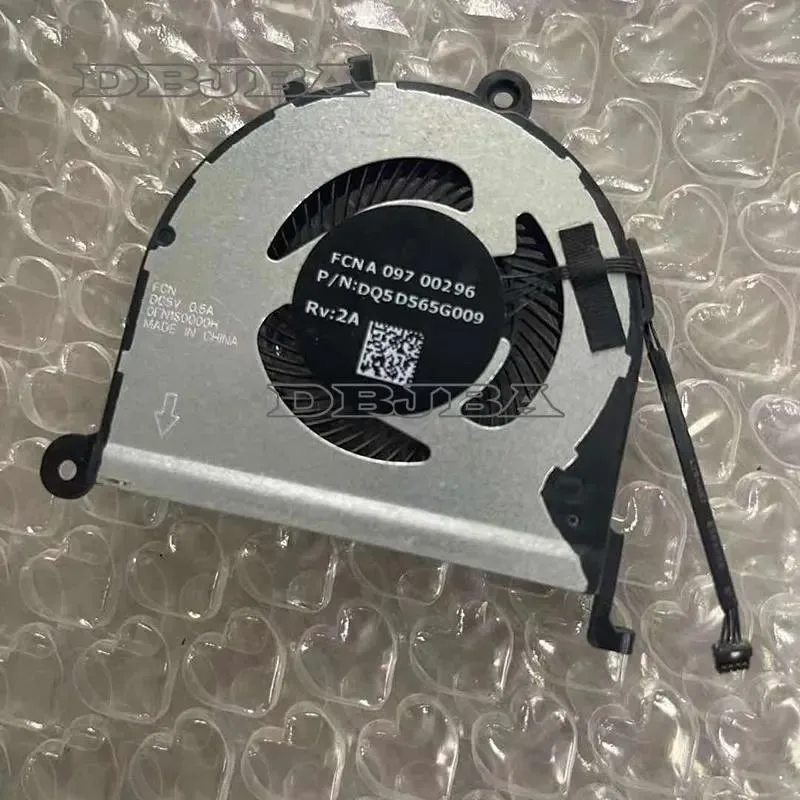
DBTLAP Cooling Fan DC5V 0.5A 0FN1S0000H DQ5D565G009 laptop cooling pad
A replacement laptop cooling fan rated for DC 5 V and 0.5 A, supplied as a single tested unit
- Accessory TypeCooler
- Reliable cooling with DC 5V 0.5A power input
- Exact replacement for part number 0FN1S0000H
- Verified compatibility via DQ5D565G009 reference
- Ready to install with single fan unit included
- Each unit tested before shipping for 100% assurance
Replacement DC 5V 0.5A Cooling Fan
This replacement cooling fan operates at DC 5V and draws 0.5A, matching the 0FN1S0000H and DQ5D565G009 part numbers. It is intended for laptop owners whose original cooler has failed or become noisy. The package includes one tested fan unit ready for installation.
Upgrade From a Worn or Failed Stock Cooler
The fan replaces the factory-fitted cooler when it no longer spins, runs loudly, or triggers thermal throttling. Swapping it restores the airflow the chassis was designed for. The jump is worth it when temperatures climb under normal load or the original bearing has seized.
Direct Fit for Compatible Laptop Models
The unit fits only the specific models that use the 0FN1S0000H and DQ5D565G009 part numbers. It handles the thermal load those designs expect. It runs out when the laptop requires a different voltage, connector, or mounting layout, so verifying the part number against the old fan is essential.
Highlights
- Reliable cooling with DC 5V 0.5A power input
- Exact replacement for part number 0FN1S0000H
- Verified compatibility via DQ5D565G009 reference
- Ready to install with single fan unit included
- Each unit tested before shipping for 100% assurance
Specifications
| Accessory Type | Cooler |
|---|
Questions about this item
What laptop models fit the 0FN1S0000H and DQ5D565G009 part numbers?
Match both part numbers exactly to your laptop service manual or the sticker on the original fan; the supplier advises checking photos and sending your model number if unsure.
How is the DC5V 0.5A fan installed and which step is often missed?
Disconnect power, remove the old fan, connect the identical 2-pin plug to the motherboard header, secure the mounting screws, then verify the new fan spins at boot before reassembling the chassis.
When will the replacement fan need service or swapping again?
The fan is tested before shipping; expect to clean dust from the blades and vents every few months and replace the unit if bearing noise or speed drop appears.
Also in this aisle
People compared these
Same shelf, same checkout — eight coins and a 30-minute rate lock.


Case Logic
Case Logic 3203990 briefcase for 15.6 in laptop with 10.1 in tablet pocket
$30.99
0.00037136BTC
In stock