


Cables To Go
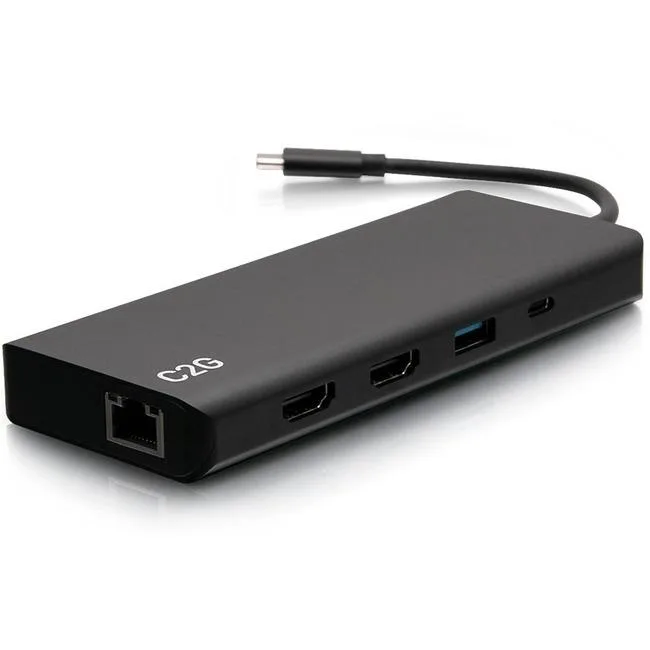
Cables To Go C2G54488 docking station 4K 30Hz dual HDMI 60W PD
Connects two HDMI monitors, wired Ethernet, audio and USB peripherals through one USB-C port while delivering up to 60W power
- Ports Spec1 x USB-C Male 1 x 3.5mm Female 1 x USB-A Female 1 x USB-C F
- Charges laptop up to 60W while you work
- Connects two HDMI monitors from one USB-C port
- Single 4K display at 3840 x 2160 30Hz
- Wired RJ-45 Ethernet for secure networks
- Three USB 3.0 plus USB 2.0 ports for peripherals
Dual 4K 30Hz HDMI docking station
This USB-C dock adds two HDMI outputs, Gigabit Ethernet, multiple USB ports and a 3.5 mm audio jack through a single reversible cable. It delivers up to 60 W of power to keep the host laptop charged while all peripherals are connected. The aluminium housing is designed for desk use with Windows or Mac systems.
Upgrade from single-port dongles
Replacing a basic USB-C adapter with this dock adds a second external monitor and a wired network link without extra cables. The jump is worth it when a single 4K display at 30 Hz or dual 1080p screens are needed for productivity. It also consolidates USB 2.0 and USB 3.0 devices into one hub.
Build integration needs
The host must provide a USB-C port that supports DisplayPort Alternate Mode and Power Delivery input. The dock frees up the laptop's remaining ports by handling video, data, audio and charging through one connection. No external power brick is required beyond the laptop's own supply.
Highlights
- Charges laptop up to 60W while you work
- Connects two HDMI monitors from one USB-C port
- Single 4K display at 3840 x 2160 30Hz
- Wired RJ-45 Ethernet for secure networks
- Three USB 3.0 plus USB 2.0 ports for peripherals
Specifications
| Brand | C2G |
|---|---|
| Model | C2G54488 |
| Ports Spec | 1 x USB-C Male 1 x 3.5mm Female 1 x USB-A Female 1 x USB-C Female 2 x HDMI Female 1 x RJ-45 Female 3 x USB 3.0 A Female |
| Shipping weight | 16.33 kg |
| Package size | 900 × 350 × 250 mm |
Questions about this item
What clearance is needed around the C2G54488 dock for its RJ-45 Ethernet port and 3.5 mm audio jack?
The dock has a hard-wired RJ-45 female port and a 3.5 mm female jack; allow enough space for an Ethernet cable and a headphone plug to insert without bending.
How do you connect the C2G54488 to a laptop and what step is often missed?
Plug the attached USB-C male connector into the laptop’s USB-C port; the reversible design removes orientation guesswork, but the laptop must support video output over USB-C for the HDMI ports to work.
When should the USB-C male cable on the C2G54488 be replaced?
Replace the dock if the fixed USB-C male cable shows fraying, bent pins or intermittent connectivity, as the cable is not user-replaceable.
Also in this aisle
People compared these
Same shelf, same checkout — eight coins and a 30-minute rate lock.


Case Logic
Case Logic 3203990 briefcase for 15.6 in laptop with 10.1 in tablet pocket
$30.99
0.00037127BTC
In stock