
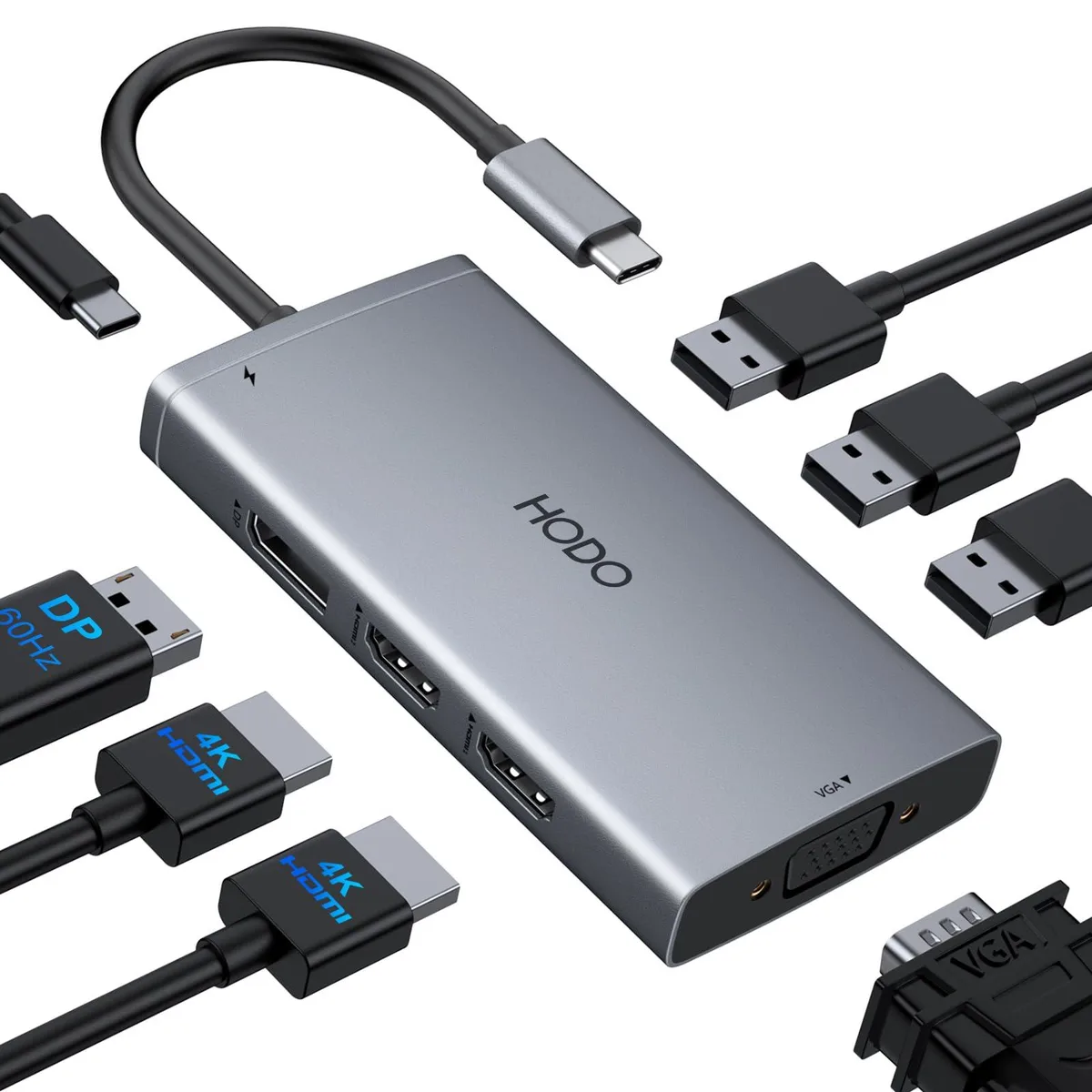


Belkin 5550/ 8-in-1 Docking Station 2×HDMI DP VGA 3×USB 2.0 100W PD
Adds dual 4K HDMI, DisplayPort, VGA and three USB 2.0 ports while delivering up to 100 W pass-through power
- ColorBlack
- CompatibilityWork with the Laptop has thunderbolt 3/4 /USB-C 3.1 Gen1/Gen
- Ports Spec1 x USB 2.0
- Weight0.13 kilograms
- Dual 4K 60 Hz monitors via two HDMI ports
- Triple display adds DisplayPort 4K 60 Hz and VGA 1080p
- Quad display runs all four outputs at 1080p 60 Hz
- Three USB 2.0 ports at 480 Mbps for peripherals
- 100 W PD input delivers up to 87 W laptop charge
8-in-1 USB-C dock for Thunderbolt laptops
This Belkin 5550 docking station adds eight connections through one USB-C port. It suits professionals who need extra displays and legacy USB-A devices while charging the host laptop. The hub works with Thunderbolt 3 or 4 and USB-C 3.1 Gen 2 or 3.2 Gen 2 ports that support DP Alt Mode and Power Delivery.
Passive cooling with 100 W PD input
The unit weighs 0.13 kg and has no fan, so it runs silently on the desk. It accepts up to 100 W from an external adapter (not included) and delivers up to 87 W to the laptop. A minimum 65 W charger is required to avoid system warnings during charging.
Compact black chassis with quad video outputs
Two HDMI ports (one 4K 60 Hz, one 4K 30 Hz), one DisplayPort 1.4 at 4K 60 Hz and one VGA at 1080p drive up to four screens. Triple 4K output needs host DP 1.4 support; connecting VGA limits all displays to 1080p. Three USB 2.0 ports at 480 Mbps handle keyboards, mice or flash drives. Not for users who need USB 3.x or Gigabit Ethernet.
Highlights
- Dual 4K 60 Hz monitors via two HDMI ports
- Triple display adds DisplayPort 4K 60 Hz and VGA 1080p
- Quad display runs all four outputs at 1080p 60 Hz
- Three USB 2.0 ports at 480 Mbps for peripherals
- 100 W PD input delivers up to 87 W laptop charge
Specifications
| Brand | Belkin |
|---|---|
| Series | 8 port docking station, HODO |
| Color | Black |
| Compatibility | Work with the Laptop has thunderbolt 3/4 /USB-C 3.1 Gen1/Gen2(with DP)/ USB-C 3.2 Gen 1/Gen2(with DP);Dell XPS 12 2-IN-1 9250/XPS 13 Laptop 9315 9340 9315 9350 9360 9370 9380 9320/XPS/Dell Latitude 3540 Laptop Model/Latitude 3440/3340 or 2-in-1/3450/3550/3110/3140/3420/3445/3510/3500/3520/3540/3571/Alienwarex14/x15/x16/x17 R2 Gaming Laptop/Dell Alienware x15 R7 Gaming Laptop/Alienware m16/m18 Gaming Laptop/HP Spectre Laptop 13-af001TU/Spectre x360 13t/Spectre folio (13t-ak000cto)/HP Spectre x2/HP Spectre x360/HP Elite×2 1012/HP Elitebook Folio G1/HP ZBook 15 G3/HP Laptop 13-af001TU/H |
| Ports Spec | 1 x USB 2.0 |
| Weight | 0.13 kilograms |
Questions about this item
How do I set up the 5550 dock for triple 4K monitors and what step is often missed?
Connect each display to the two HDMI, one DisplayPort or VGA ports, use a laptop with a Thunderbolt 3 or 4 or USB-C port that supports DP 1.4 Alt Mode, and supply at least 65 W through the USB-C PD port; the step most people miss is confirming the host port actually carries DP 1.4 video.
What will need replacement first on the 5550 dock?
The USB 2.0 ports rated at 480 Mbps and the 100 W PD charging circuit are the only active components; cables or the external power adapter will wear out before the dock itself.
What limit appears first during sustained use of the 5550 dock?
Driving three 4K 60 Hz streams requires a host with DP 1.4 bandwidth; if the laptop only supports DP 1.2 the dock falls back to 1080p on all outputs, and the 87 W safe charging ceiling caps power delivery under heavy load.
Also in this aisle
People compared these
Same shelf, same checkout — eight coins and a 30-minute rate lock.


Case Logic
Case Logic 3203990 briefcase for 15.6 in laptop with 10.1 in tablet pocket
$30.99
0.00037311BTC
In stock