


AUTYUE
AUTYUE Dual Monitor DisplayPort KVM Switch 8K@30Hz 4K@144Hz
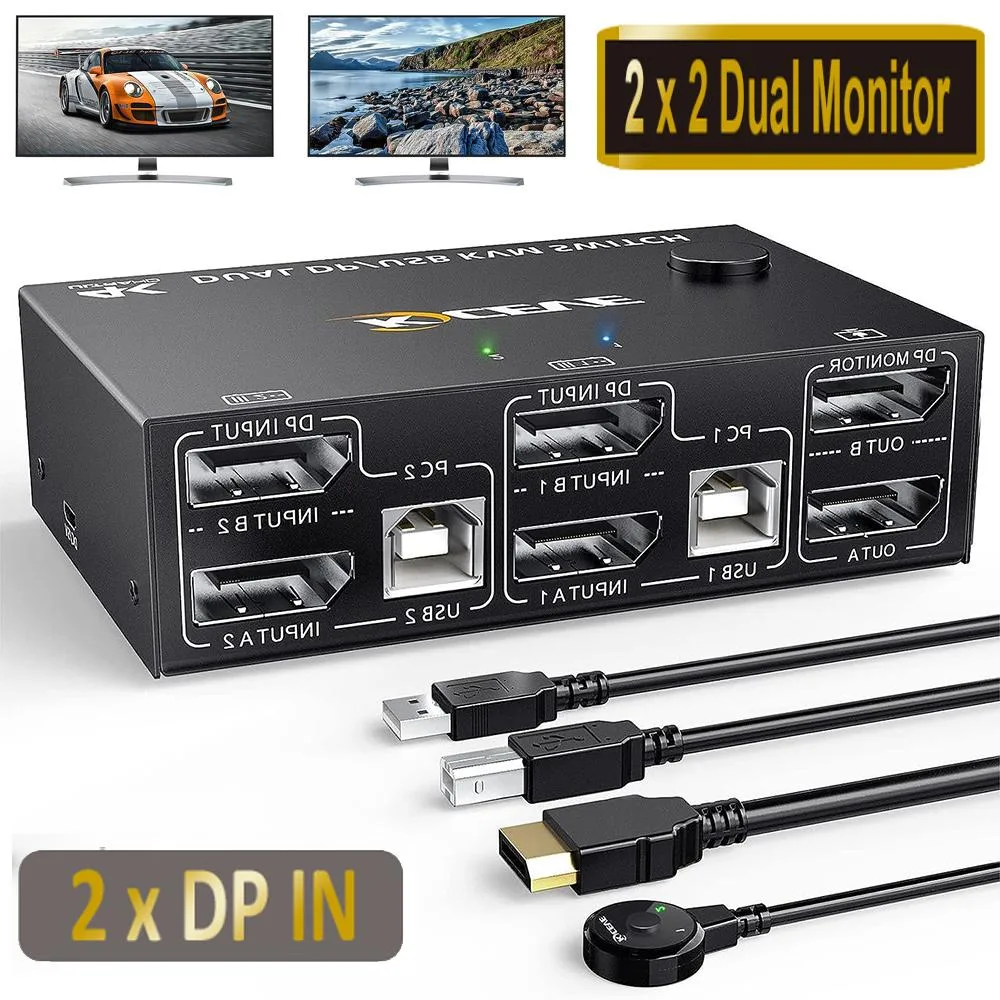
Controls two computers with one keyboard, mouse and dual monitors at up to 8K@30Hz or 4K@120Hz via DisplayPort 1.4
- TypeDisplayPort, USB
- PC Connectors2 Computers
- Computer Connections2 Ports
- Monitor Connections2 Monitors
- Video Resolution8K@30Hz, 4K@120Hz, 2K@144Hz
- PC SelectionPush Buttons
- Control two computers with one keyboard, mouse and dual monitors
- 8K 30 Hz, 4K 120 Hz and 2K 144 Hz resolution support
- Four USB 2.0 ports for keyboard, mouse, printer or webcam
- Switch via front panel buttons or 1.5 m wired remote
- No external power supply needed — draws power from USB
Dual-monitor DP KVM for two PCs
This DisplayPort 1.4 KVM switch lets two computers share one keyboard, one mouse and two monitors. It supports mirrored or extended desktop modes and is aimed at home-office workers, gamers and streamers who need to toggle between two systems without unplugging cables. The unit is new and requires no external power supply.
Driver-free setup with two switching methods
The switch is plug-and-play on Windows, macOS, Linux and Chrome OS; no driver installation is needed. You can change the active computer using the front-panel push buttons or the included 1.5 m wired remote control. LED indicators show which PC is currently selected. Four USB 2.0 ports handle keyboards, mice, printers or webcams, though high-draw peripherals may need their own power source to avoid flicker.
Check your graphics outputs
Both computers must provide two DisplayPort outputs each to drive the dual-monitor extended mode. The box includes four 1.5 m DP cables and two 1.5 m USB cables; verify these lengths reach your layout. Final resolution depends on the GPU, monitor and cable combination — 8K at 30 Hz, 4K at 120 Hz or 2K at 144 Hz are the supported ceilings. Buyers who need more than two monitor outputs or who lack DisplayPort ports on one system cannot use this switch as intended.
Highlights
- Control two computers with one keyboard, mouse and dual monitors
- 8K 30 Hz, 4K 120 Hz and 2K 144 Hz resolution support
- Four USB 2.0 ports for keyboard, mouse, printer or webcam
- Switch via front panel buttons or 1.5 m wired remote
- No external power supply needed — draws power from USB
Specifications
| Type | DisplayPort, USB |
|---|---|
| PC Connectors | 2 Computers |
| Computer Connections | 2 Ports |
| Monitor Connections | 2 Monitors |
| Video Resolution | 8K@30Hz, 4K@120Hz, 2K@144Hz |
| PC Selection | Push Buttons |
| Monitors Supported | Dual Monitor Displayport |
| LED Indicators | Yes |
| Power Features | Requires no additional power supply |
| USB Features | with USB support |
| Application | This dual-monitor KVM switches controls 2 PCs or laptops with only one set of keyboard, mouse and 2 monitors. Can display mirrored and extended desktops, or display information from two PCs for home office setup, gaming, and streaming device support. No more plugging and unplugging problems, no more Tangle Terminator |
| Features | 【Ultra HD 8K@30Hz Resolution】DP 1.4 KVM Switch 2 PC 2 monitors, supports up to 8K@30Hz, 4K@120Hz, 2K@144Hz, backward compatible with DP 1.2. Note: The final resolution also depends on how the graphics card, monitor, cables and adapters interact with each other, and how they all work together to achieve 8K, then the graphics card, monitor and cables should all support 8K, otherwise, you will get a black screen or a splash screen. 【DP KVM Switch with 4 USB 2.0 HUB】DisplayPort Dual Monitor KVM Switch with 4 USB 2.0 ports for detecting keyboards, mice, printers, scanners and other USB de |
| Dimensions | 10,1 x 6,5 x 3 cm |
| Weight | 620 Gramm |
| Package Contents | 1 x DisplayPort KVM Switch 2 x DisplayPort cable 1.5 m 2 x USB cable 1.5 m 1 x wired remote control cable 1.5 m 1 x User Manual |
Questions about this item
How do I verify the KVM switch is passing 4K at 144 Hz to both monitors after setup?
Check the LED indicators on the front panel to confirm the active PC, then open the display settings on that PC and ensure each monitor reports 2560×1440 at 144 Hz.
What cables and accessories are included in the box, and what must I provide separately?
The package includes the KVM unit, two 1.5 m DisplayPort cables, two 1.5 m USB cables, a 1.5 m wired remote cable and a user manual; you must supply your own keyboard, mouse and any additional USB peripherals.
Which resolution and refresh-rate combination should I select for my 3440×1440 ultra-wide monitor?
Choose 3440×1440 at 144 Hz, which is explicitly supported; the switch also handles 8K at 30 Hz, 4K at 120 Hz and 2560×1440 at 144 Hz depending on your graphics card and cable quality.
Also in this aisle
People compared these
Same shelf, same checkout — eight coins and a 30-minute rate lock.


Black Box Corporation
Black Box Corporation 4K60 HDMI Dual-Head KVM Switch 4 Port
$774.99
0.00928232BTC
In stock