


AUTYUE
AUTYUE 2-Port Dual Monitor DP1.4 KVM Switch 4×USB 3.0 8K60 4K120
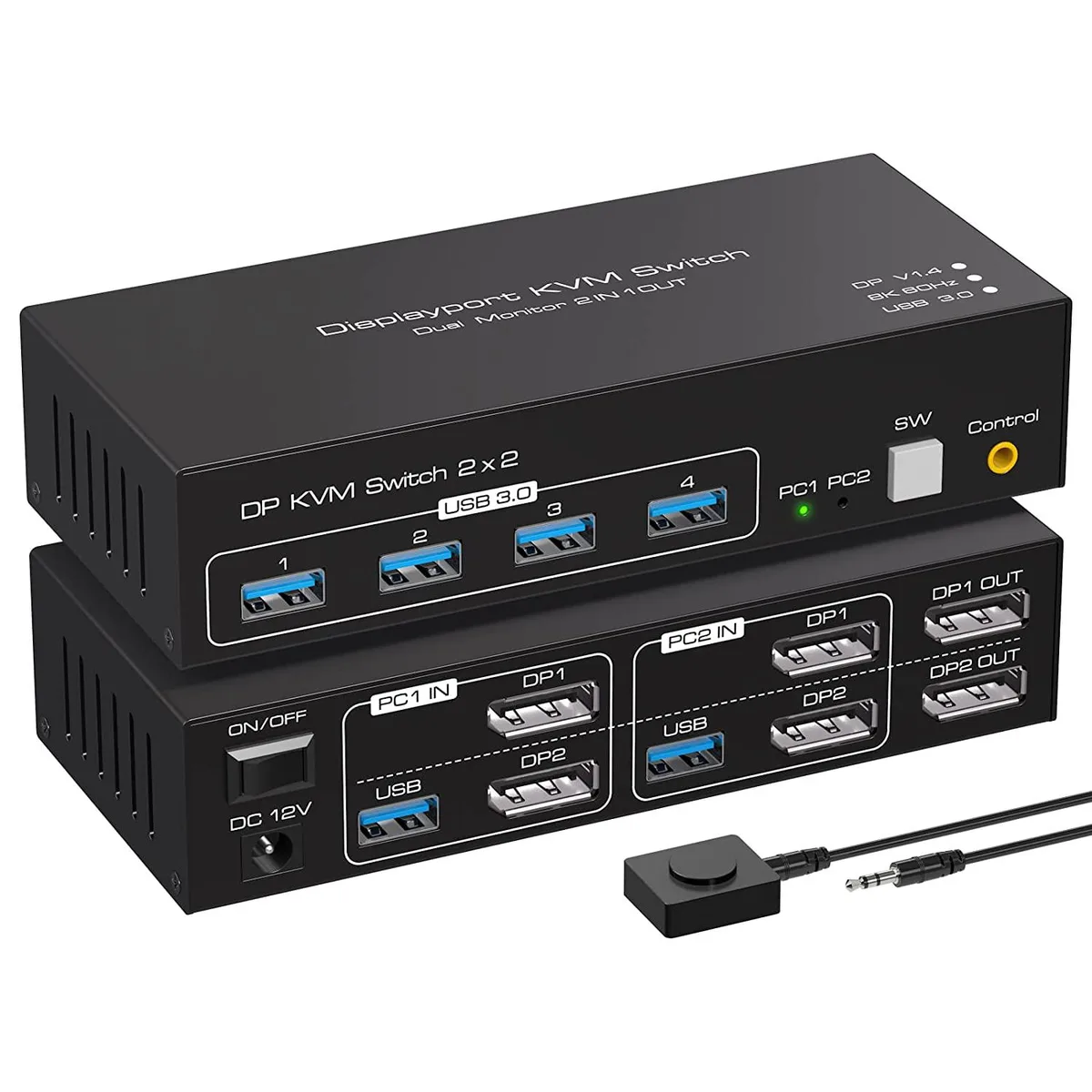
A dual-monitor DisplayPort 1.4 KVM switch shares one keyboard, mouse and four USB 3.0 peripherals between two computers at up to 7680×4320@60Hz or 4K@120Hz
- TypeDisplayPort, USB
- PC Connectors2 PCs
- Computer Connections2 Ports
- Monitor Connections2 Ports
- Video Resolution7680*4320
- Monitors SupportedDual Monitor Displayport
- Share two PCs, two monitors, keyboard and mouse with one KVM
- Push-button or external cable control for instant source switching
- Supports 7680×4320 at 60 Hz and 4K at 120 Hz
- Four USB 3.0 ports deliver 5 Gbps data and 48 Gbps video bandwidth
- Copy or extended display modes for flexible dual-monitor workflows
Dual-monitor DP 1.4 KVM for two PCs
This KVM switch connects two computers to two DisplayPort monitors, one keyboard and one mouse. It supports copy mode for duplicated screens and extended mode for separate desktops when each host has two DP outputs. Front-panel buttons and a wired remote both change the active source. No external power supply is required for basic operation.
Four USB 3.0 ports and plug-and-play OS support
Four USB 3.0 hub ports share printers, scanners or storage between the two systems at up to 5 Gbps data rates. The switch works with Windows, macOS, Linux and Unix without driver installation. Video bandwidth reaches 48 Gbps, enabling 8K at 60 Hz or 4K at 120 Hz while remaining compatible with 1080p and other lower resolutions.
Replaces separate cables and single-monitor switches
Users moving from manual cable swapping or a single-display KVM gain simultaneous dual-monitor switching and shared USB peripherals in one unit. The upgrade is worthwhile when both computers provide two DP 1.4 outputs and the workflow demands 8K60 or 4K120 video plus high-speed USB sharing. Buyers needing only one monitor or lacking dual DP outputs on a host will not use the extended-mode capability.
Highlights
- Share two PCs, two monitors, keyboard and mouse with one KVM
- Push-button or external cable control for instant source switching
- Supports 7680×4320 at 60 Hz and 4K at 120 Hz
- Four USB 3.0 ports deliver 5 Gbps data and 48 Gbps video bandwidth
- Copy or extended display modes for flexible dual-monitor workflows
Specifications
| Type | DisplayPort, USB |
|---|---|
| PC Connectors | 2 PCs |
| Computer Connections | 2 Ports |
| Monitor Connections | 2 Ports |
| Video Resolution | 7680*4320 |
| Monitors Supported | Dual Monitor Displayport |
| Power Features | Requires no additional power supply |
| USB Features | with USB support |
| Application | The 2-port dual-channel DP KVM switch can be connected to 2 computer hosts, sharing 1 set of keyboard, mouse and 2 monitors. Supports copy and expansion modes for computer hosts (computer host graphics card needs to have 2 DP outputs), Mode 1: Copy mode (computer host outputs 2 identical screens on 2 displays). Mode 2: Extended mode (PC host outputs 2 different screens on 2 displays) |
| Features | This KVM displayport 1.4 switch has has four USB 3.0 ports and supports video bandwidth up to 48Gbps, data transfer rates up to 5Gbps and is backwards compatible with USB 2.0 and USB 1.1 devices. It supports various operating systems such as Windows/Vista/XP and Mac OS, Linux and Unix, and is plug and play. |
| Package Contents | 1 x KVM Switch, 2 x USB Cable, 1 x Controller Cable, 1 x Power Adapter, 1 x User Manual |
Questions about this item
Will the 48 Gbps video bandwidth handle 8K at 60 Hz on both monitors continuously?
The switch is rated for 48 Gbps and supports 7680×4320 at 60 Hz per port, so sustained dual 8K 60 Hz is within spec.
Does the unit stay cool and quiet when powered all day without an extra power supply?
It draws power from the connected PCs and has no fan, so it runs silently and stays at a low temperature during continuous use.
Do both computers need two DisplayPort 1.4 outputs each to use the dual-monitor modes?
Yes, copy and extended modes require each host to provide two DP 1.4 signals; a single DP output cannot drive both monitors.
Also in this aisle
People compared these
Same shelf, same checkout — eight coins and a 30-minute rate lock.


Black Box Corporation
Black Box Corporation 4K60 HDMI Dual-Head KVM Switch 4 Port
$774.99
0.00929323BTC
In stock