


AUTYUE
AUTYUE 2 DP1.4 + HDMI2.1 Triple Monitor KVM Switch 2 PC 3 Monitors 4 USB 3.0
A KVM switch that lets two computers share three monitors and four USB 3.0 peripherals at up to 8K@60Hz or 4K@144Hz
- Type2 Displayport + HDMI USB 3.0
- PC Connectors2 PC
- Computer Connections2 Ports
- Monitor Connections3 Ports
- Video Resolutionsupports up to 8K@60Hz/4K@144Hz
- PC SelectionPush Buttons
- Share 3 monitors and 4 USB 3.0 devices between 2 computers
- HDMI 2.1 carries 8K at 60 Hz and 4K at 120 Hz
- DisplayPort 1.4 carries 4K at 144 Hz and 8K at 30 Hz
- USB 3.0 ports deliver up to 5 Gbps data speed
- Switch PCs with front button or wired remote
Triple-monitor KVM for two computers
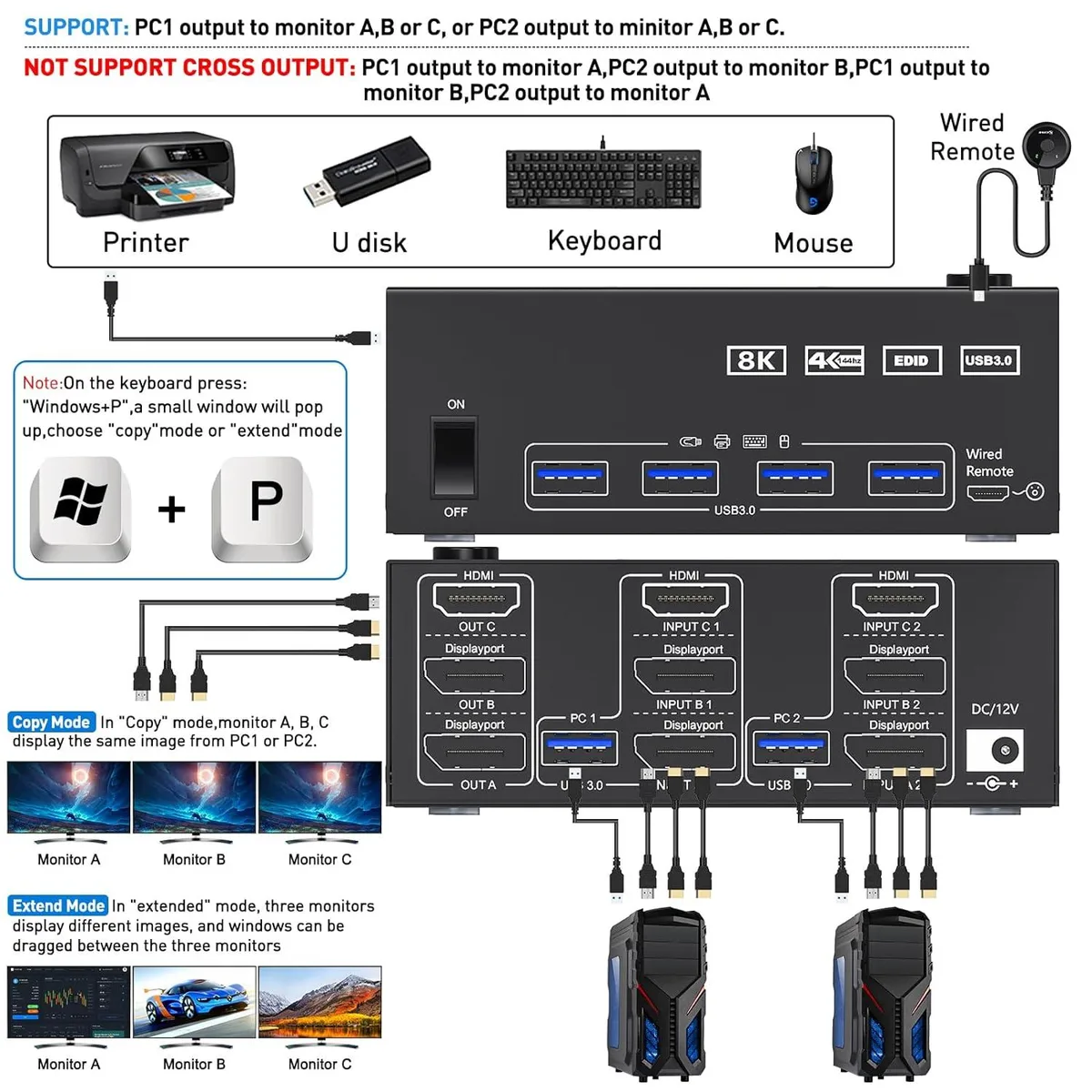
This AUTYUE switch lets two desktops or laptops share three displays and four USB 3.0 peripherals. It is aimed at home-office workers and multi-system users who want a single keyboard, mouse and monitor set without unplugging cables. The unit requires each computer to support three simultaneous video outputs for full triple-screen operation. Driver-free compatibility covers Windows, Mac, Linux and common consoles.
Push-button and wired-remote switching
The metal enclosure measures 4.72 by 2.56 by 1.77 inches and weighs 2.16 pounds, sitting neatly on a desk. Video inputs comprise two DisplayPort 1.4 ports and one HDMI 2.1 port per computer, while four USB 3.0 ports handle peripherals at up to 5 Gbps. No external power supply is needed for basic operation, though a power adapter is included for demanding setups. Front-panel buttons and the supplied wired remote both change the active computer instantly.
8K 60 Hz and 4K 144 Hz video support
HDMI 2.1 delivers 8K at 60 Hz and 4K at 120 Hz, while DisplayPort 1.4 handles 8K at 30 Hz and 4K at 144 Hz, all backward compatible. This resolution ceiling is the decisive spec: buyers needing higher refresh rates at 8K or more than three monitors must look elsewhere. The package includes two DP 1.4 cables, one HDMI 2.1 cable, two USB 3.0 cables, the power adapter, wired remote and manual.
Highlights
- Share 3 monitors and 4 USB 3.0 devices between 2 computers
- HDMI 2.1 carries 8K at 60 Hz and 4K at 120 Hz
- DisplayPort 1.4 carries 4K at 144 Hz and 8K at 30 Hz
- USB 3.0 ports deliver up to 5 Gbps data speed
- Switch PCs with front button or wired remote
Specifications
| Type | 2 Displayport + HDMI USB 3.0 |
|---|---|
| PC Connectors | 2 PC |
| Computer Connections | 2 Ports |
| Monitor Connections | 3 Ports |
| Video Resolution | supports up to 8K@60Hz/4K@144Hz |
| PC Selection | Push Buttons |
| Monitors Supported | Triple Monitor |
| LED Indicators | Yes |
| Audio Features | No |
| Power Features | Requires no additional power supply |
| USB Features | with USB support |
| Application | 2 Displayport1.4+HDMI2.1 USB3.0 KVM Switch allows 2 desktops/laptops to share 3 monitors and 4 USB3.0 devices.It can make your work space tidy and efficient, also a premium choice for working from home. |
| Features | 2 computers share one set of keyboard mouse and 3 monitors. KVM triple monitors support extended and mirror display. Support wired or wireless keyboard and mouse. Cross support most major OS including Windows, Linux, Mac OS. USB KVM switch with 4 USB 3.0 ports for keyboard, mouse, printer, etc. Switching modes: Button switch and wired remote (1.5m),switch between 2 computers just need 2-4 seconds, fast and convenient. |
| Dimensions | 4.72 x 2.56 x 1.77 inches |
| Weight | 2.16 Pounds |
| Package Contents | 1x Triple Monitor KVM Switch, 2x DP1.4 Cable, 1x HDMI2.1 Cable, 2x USB 3.0 Cable, 1x Power Adapter, 1x Wired Remote, 1x User's Manual. |
Questions about this item
What resolution and refresh rate does the DisplayPort 1.4 input actually support?
DisplayPort 1.4 is limited to 8K at 30 Hz or 4K at 144 Hz, while the HDMI 2.1 port reaches 8K at 60 Hz and 4K at 120 Hz.
How much desk space does the switch need, and does it require a separate power brick?
The unit measures 4.72 by 2.56 by 1.77 inches and weighs 2.16 pounds; it draws power from the included adapter rather than the host computers.
How do I toggle between the two connected PCs, and what is the common mistake?
Press the front-panel button or use the wired remote; the step users miss is pressing Win+P on the active PC to choose extend or copy mode after switching.
Also in this aisle
People compared these
Same shelf, same checkout — eight coins and a 30-minute rate lock.


Black Box Corporation
Black Box Corporation 4K60 HDMI Dual-Head KVM Switch 4 Port
$774.99
0.00923927BTC
In stock