
AUBEAMTO
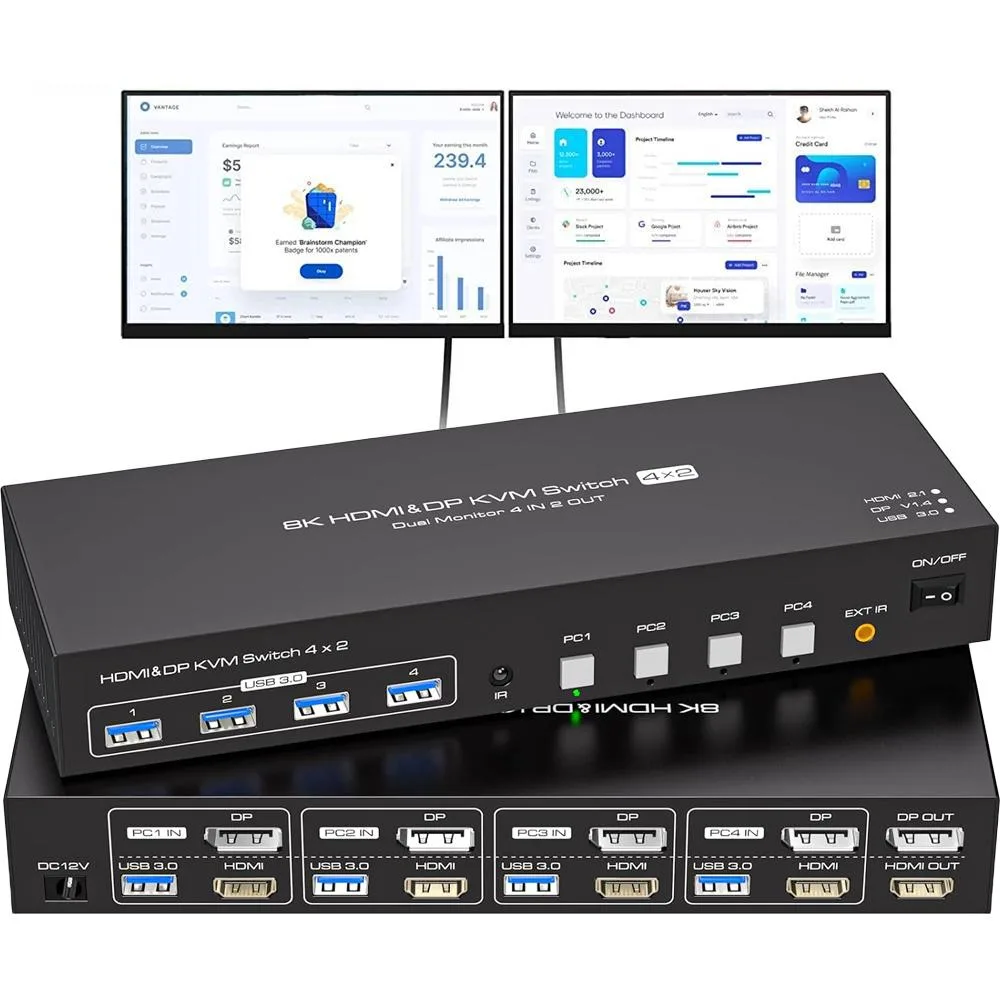
AUBEAMTO SW245-1DP1HD 4-Port Dual Monitor KVM Switch 8K@60Hz 4K@144Hz
- DisplayPort, HDMI,…
- 4 Ports
$123.99
0.00149139BTC
In stockWe take cryptocurrency — so the coins you hold can buy real hardware.Pay in crypto, spend it on real hardware. Free insured shipping worldwide over $399. Plain, unbranded boxes, sent from Germany.Free insured shipping over $399. Your rate is locked for 30 minutes once checkout opens.Rate locked 30 minutes. Every item sealed, serial-checked and covered by a 24-month warranty.Sealed, 24-month warranty.


AUBEAMTO
Controls four computers with one keyboard, mouse, dual monitors and USB 3.0 devices at up to 4K 60 Hz or 2K 120 Hz
Resolution 4K@60Hz
This AUBEAMTO SW244-1HD1DP switch lets four desktops or laptops share one keyboard, one mouse and two monitors, plus four USB 3.0 peripherals. It accepts one HDMI and one DisplayPort from each computer and outputs to one HDMI monitor and one DisplayPort monitor. A 12 V DC power adapter and four USB 3.0 cables are included.
Ideal for users who run four computers and want a tidy dual-monitor workspace with duplicate or extended display modes. Not suited for buyers whose machines lack both HDMI and DisplayPort outputs, or who only have two HDMI or two DisplayPort monitors. Also not for setups that need more than four USB 3.0 ports or switching without external power.
The decisive specification is the 4-in, 2-out video topology: each of the four computers must provide both an HDMI and a DisplayPort signal, and the two attached monitors must match those interfaces exactly.
| Brand | AUBEAMTO |
|---|---|
| Series | SW244-1HD1DP |
| Type | KVM Switch |
| Computer Connections | 4 Ports |
| Monitor Connections | 2 Ports |
| Video Resolution | 3840*2160 |
| Monitors Supported | HDMI+DP |
| LED Indicators | Yes |
| Power Features | 12V DC |
| USB Features | with USB support |
| SplitterOnly | Video Switch |
| Application | USB 3.0 DP+HDMI KVM Switch Dual Monitor HDMI 4 Port This dual monitor 4 IN 2 OUT DP+HDMI KVM Switch is for you to control them using one set of keyboard, mouse and single or dual monitors to make your work space tidy and efficient, also a premium choice for working from home. Only when your computer supports dual display or multi display, you can use this KVM to achieve 4 PC to share 2 monitors. (Extended or mirrored modes depend on your computer's graphics card). |
| Features | USB3.0 DP+HDMI Displayport KVM Switch 4 ports dual monitor Product Features: 4 computers/laptops share one set of keyboard, mouse and dual monitors, and more USB 3.0 peripherals; Support maximum resolution up to 2K 120Hz Dual monitors output support up to 4K@60Hz/2K@120Hz,1080P@240Hz for extended and mirrored display; Compatible with Windows 11/10/8/7/2000/XP/Vista, Linux, UNIX, Ubuntu, Fedora, and other systems; Advanced switching modes: push button and IR remote control;No complicated installation is required, and non-professionals can easily operate it; The ports that need to plug |
| Dimensions | 8.66 x 5.31 x 1.69 inches |
| Weight | 15.8 ounces |
| Package Contents | You will receive a 1*4 in 1 out KVM switcher, 4*USB 3.0 A to A cables, 1*12V1A external power supply, 1*IR cable, 1*remote control (excluding battery), and 1*user manual. |
Other versions of this model
Same family, different memory, cooler or clock — compare before you commit.
Each computer needs one HDMI output and one DisplayPort output to match the switch’s HDMI+DP inputs.
They forget to connect the USB cable from every computer to its matching port on the switch, so keyboard and mouse control fails on the unlinked ports.
The remote control ships without a battery; a standard button cell must be supplied separately.
Also in this aisle
Same shelf, same checkout — eight coins and a 30-minute rate lock.
What you pay in, and what you read prices in.
Sent from your wallet at checkout
Display only — the catalogue is priced in USD
No currency matches that.
New here?
Already have one?
There is no automatic reset: this shop sends no mail, so there is no one-time link to ask for. Leave the address on the account and it gets picked up by hand.
Request noted
Nothing is on its way to your inbox — this shop sends no mail at all. Someone picks these up by hand.
Remembered it?


